企业级AI落地项目系列课程详解 -> 点击进入

四、Unsloth基本使用方法介绍

  Unsloth是一个集模型调用和高效微调为一体的框架,在开始进行模型微调前,我们可以先尝试借助Unsloth进行模型调用。需要注意的是,Unsloth的使用难度远比一般的微调框架简单,在Jupyter中即可完成模型微调,且微调结束后还可以直接进行模型调用,并支持在Jupyter中进行模型权重合并与导出,非常便捷。

Python
import os
os.environ["CUDA_VISIBLE_DEVICES"] = "1"

由于当前实验环境是多卡环境,而动态量化模型只支持单卡运行,因此这里先设置接下来运行的GPU编号。

1.模型导入与调用流程

  首先进行模型导入:

Python
from unsloth import FastLanguageModel
import torch

Plaintext
🦥 Unsloth: Will patch your computer to enable 2x faster free finetuning.


/root/miniconda3/envs/unsloth/lib/python3.11/site-packages/tqdm/auto.py:21: TqdmWarning: IProgress not found. Please update jupyter and ipywidgets. See https://ipywidgets.readthedocs.io/en/stable/user_install.html
  from .autonotebook import tqdm as notebook_tqdm


🦥 Unsloth Zoo will now patch everything to make training faster!

Python
max_seq_length = 8192
dtype = None
load_in_4bit = True

Python
model, tokenizer = FastLanguageModel.from_pretrained(
    model_name = "./Qwen3-32B-unsloth-bnb-4bit",
    max_seq_length = max_seq_length,
    dtype = dtype,
    load_in_4bit = load_in_4bit,
)

Plaintext
==((====))==  Unsloth 2025.4.7: Fast Qwen3 patching. Transformers: 4.51.3.
   \\   /|    NVIDIA H800 PCIe. Num GPUs = 1. Max memory: 79.205 GB. Platform: Linux.
O^O/ \_/ \    Torch: 2.7.0+cu126. CUDA: 9.0. CUDA Toolkit: 12.6. Triton: 3.3.0
\        /    Bfloat16 = TRUE. FA [Xformers = 0.0.30. FA2 = False]
 "-____-"     Free license: http://github.com/unslothai/unsloth
Unsloth: Fast downloading is enabled - ignore downloading bars which are red colored!


Loading checkpoint shards: 100%|██████████| 9/9 [00:16<00:00,  1.86s/it]

导入完成后即可查看模型基本情况,包括模型结构和分词器信息等:

Python
model

Plaintext
Qwen3ForCausalLM(
  (model): Qwen3Model(
    (embed_tokens): Embedding(151936, 5120, padding_idx=151654)
    (layers): ModuleList(
      (0-5): 6 x Qwen3DecoderLayer(
        (self_attn): Qwen3Attention(
          (q_proj): Linear4bit(in_features=5120, out_features=8192, bias=False)
          (k_proj): Linear4bit(in_features=5120, out_features=1024, bias=False)
          (v_proj): Linear4bit(in_features=5120, out_features=1024, bias=False)
          (o_proj): Linear4bit(in_features=8192, out_features=5120, bias=False)
          (q_norm): Qwen3RMSNorm((128,), eps=1e-06)
          (k_norm): Qwen3RMSNorm((128,), eps=1e-06)
          (rotary_emb): LlamaRotaryEmbedding()
        )
        (mlp): Qwen3MLP(
          (gate_proj): Linear4bit(in_features=5120, out_features=25600, bias=False)
          (up_proj): Linear4bit(in_features=5120, out_features=25600, bias=False)
          (down_proj): Linear4bit(in_features=25600, out_features=5120, bias=False)
          (act_fn): SiLU()
        )
        (input_layernorm): Qwen3RMSNorm((5120,), eps=1e-06)
        (post_attention_layernorm): Qwen3RMSNorm((5120,), eps=1e-06)
      )
      (6): Qwen3DecoderLayer(
        (self_attn): Qwen3Attention(
          (q_proj): Linear(in_features=5120, out_features=8192, bias=False)
          (k_proj): Linear(in_features=5120, out_features=1024, bias=False)
          (v_proj): Linear(in_features=5120, out_features=1024, bias=False)
          (o_proj): Linear(in_features=8192, out_features=5120, bias=False)
          (q_norm): Qwen3RMSNorm((128,), eps=1e-06)
          (k_norm): Qwen3RMSNorm((128,), eps=1e-06)
          (rotary_emb): LlamaRotaryEmbedding()
        )
        (mlp): Qwen3MLP(
          (gate_proj): Linear(in_features=5120, out_features=25600, bias=False)
          (up_proj): Linear(in_features=5120, out_features=25600, bias=False)
          (down_proj): Linear(in_features=25600, out_features=5120, bias=False)
          (act_fn): SiLU()
        )
        (input_layernorm): Qwen3RMSNorm((5120,), eps=1e-06)
        (post_attention_layernorm): Qwen3RMSNorm((5120,), eps=1e-06)
      )
      (7): Qwen3DecoderLayer(
        (self_attn): Qwen3Attention(
          (q_proj): Linear4bit(in_features=5120, out_features=8192, bias=False)
          (k_proj): Linear4bit(in_features=5120, out_features=1024, bias=False)
          (v_proj): Linear4bit(in_features=5120, out_features=1024, bias=False)
          (o_proj): Linear4bit(in_features=8192, out_features=5120, bias=False)
          (q_norm): Qwen3RMSNorm((128,), eps=1e-06)
          (k_norm): Qwen3RMSNorm((128,), eps=1e-06)
          (rotary_emb): LlamaRotaryEmbedding()
        )
        (mlp): Qwen3MLP(
          (gate_proj): Linear4bit(in_features=5120, out_features=25600, bias=False)
          (up_proj): Linear4bit(in_features=5120, out_features=25600, bias=False)
          (down_proj): Linear(in_features=25600, out_features=5120, bias=False)
          (act_fn): SiLU()
        )
        (input_layernorm): Qwen3RMSNorm((5120,), eps=1e-06)
        (post_attention_layernorm): Qwen3RMSNorm((5120,), eps=1e-06)
      )
      (8-22): 15 x Qwen3DecoderLayer(
        (self_attn): Qwen3Attention(
          (q_proj): Linear4bit(in_features=5120, out_features=8192, bias=False)
          (k_proj): Linear4bit(in_features=5120, out_features=1024, bias=False)
          (v_proj): Linear4bit(in_features=5120, out_features=1024, bias=False)
          (o_proj): Linear4bit(in_features=8192, out_features=5120, bias=False)
          (q_norm): Qwen3RMSNorm((128,), eps=1e-06)
          (k_norm): Qwen3RMSNorm((128,), eps=1e-06)
          (rotary_emb): LlamaRotaryEmbedding()
        )
        (mlp): Qwen3MLP(
          (gate_proj): Linear4bit(in_features=5120, out_features=25600, bias=False)
          (up_proj): Linear4bit(in_features=5120, out_features=25600, bias=False)
          (down_proj): Linear4bit(in_features=25600, out_features=5120, bias=False)
          (act_fn): SiLU()
        )
        (input_layernorm): Qwen3RMSNorm((5120,), eps=1e-06)
        (post_attention_layernorm): Qwen3RMSNorm((5120,), eps=1e-06)
      )
      (23-44): 22 x Qwen3DecoderLayer(
        (self_attn): Qwen3Attention(
          (q_proj): Linear4bit(in_features=5120, out_features=8192, bias=False)
          (k_proj): Linear4bit(in_features=5120, out_features=1024, bias=False)
          (v_proj): Linear4bit(in_features=5120, out_features=1024, bias=False)
          (o_proj): Linear4bit(in_features=8192, out_features=5120, bias=False)
          (q_norm): Qwen3RMSNorm((128,), eps=1e-06)
          (k_norm): Qwen3RMSNorm((128,), eps=1e-06)
          (rotary_emb): LlamaRotaryEmbedding()
        )
        (mlp): Qwen3MLP(
          (gate_proj): Linear(in_features=5120, out_features=25600, bias=False)
          (up_proj): Linear(in_features=5120, out_features=25600, bias=False)
          (down_proj): Linear(in_features=25600, out_features=5120, bias=False)
          (act_fn): SiLU()
        )
        (input_layernorm): Qwen3RMSNorm((5120,), eps=1e-06)
        (post_attention_layernorm): Qwen3RMSNorm((5120,), eps=1e-06)
      )
      (45): Qwen3DecoderLayer(
        (self_attn): Qwen3Attention(
          (q_proj): Linear4bit(in_features=5120, out_features=8192, bias=False)
          (k_proj): Linear4bit(in_features=5120, out_features=1024, bias=False)
          (v_proj): Linear4bit(in_features=5120, out_features=1024, bias=False)
          (o_proj): Linear(in_features=8192, out_features=5120, bias=False)
          (q_norm): Qwen3RMSNorm((128,), eps=1e-06)
          (k_norm): Qwen3RMSNorm((128,), eps=1e-06)
          (rotary_emb): LlamaRotaryEmbedding()
        )
        (mlp): Qwen3MLP(
          (gate_proj): Linear(in_features=5120, out_features=25600, bias=False)
          (up_proj): Linear(in_features=5120, out_features=25600, bias=False)
          (down_proj): Linear(in_features=25600, out_features=5120, bias=False)
          (act_fn): SiLU()
        )
        (input_layernorm): Qwen3RMSNorm((5120,), eps=1e-06)
        (post_attention_layernorm): Qwen3RMSNorm((5120,), eps=1e-06)
      )
      (46-54): 9 x Qwen3DecoderLayer(
        (self_attn): Qwen3Attention(
          (q_proj): Linear4bit(in_features=5120, out_features=8192, bias=False)
          (k_proj): Linear4bit(in_features=5120, out_features=1024, bias=False)
          (v_proj): Linear4bit(in_features=5120, out_features=1024, bias=False)
          (o_proj): Linear4bit(in_features=8192, out_features=5120, bias=False)
          (q_norm): Qwen3RMSNorm((128,), eps=1e-06)
          (k_norm): Qwen3RMSNorm((128,), eps=1e-06)
          (rotary_emb): LlamaRotaryEmbedding()
        )
        (mlp): Qwen3MLP(
          (gate_proj): Linear(in_features=5120, out_features=25600, bias=False)
          (up_proj): Linear(in_features=5120, out_features=25600, bias=False)
          (down_proj): Linear(in_features=25600, out_features=5120, bias=False)
          (act_fn): SiLU()
        )
        (input_layernorm): Qwen3RMSNorm((5120,), eps=1e-06)
        (post_attention_layernorm): Qwen3RMSNorm((5120,), eps=1e-06)
      )
      (55-61): 7 x Qwen3DecoderLayer(
        (self_attn): Qwen3Attention(
          (q_proj): Linear4bit(in_features=5120, out_features=8192, bias=False)
          (k_proj): Linear4bit(in_features=5120, out_features=1024, bias=False)
          (v_proj): Linear4bit(in_features=5120, out_features=1024, bias=False)
          (o_proj): Linear4bit(in_features=8192, out_features=5120, bias=False)
          (q_norm): Qwen3RMSNorm((128,), eps=1e-06)
          (k_norm): Qwen3RMSNorm((128,), eps=1e-06)
          (rotary_emb): LlamaRotaryEmbedding()
        )
        (mlp): Qwen3MLP(
          (gate_proj): Linear4bit(in_features=5120, out_features=25600, bias=False)
          (up_proj): Linear4bit(in_features=5120, out_features=25600, bias=False)
          (down_proj): Linear4bit(in_features=25600, out_features=5120, bias=False)
          (act_fn): SiLU()
        )
        (input_layernorm): Qwen3RMSNorm((5120,), eps=1e-06)
        (post_attention_layernorm): Qwen3RMSNorm((5120,), eps=1e-06)
      )
      (62): Qwen3DecoderLayer(
        (self_attn): Qwen3Attention(
          (q_proj): Linear4bit(in_features=5120, out_features=8192, bias=False)
          (k_proj): Linear4bit(in_features=5120, out_features=1024, bias=False)
          (v_proj): Linear4bit(in_features=5120, out_features=1024, bias=False)
          (o_proj): Linear4bit(in_features=8192, out_features=5120, bias=False)
          (q_norm): Qwen3RMSNorm((128,), eps=1e-06)
          (k_norm): Qwen3RMSNorm((128,), eps=1e-06)
          (rotary_emb): LlamaRotaryEmbedding()
        )
        (mlp): Qwen3MLP(
          (gate_proj): Linear(in_features=5120, out_features=25600, bias=False)
          (up_proj): Linear(in_features=5120, out_features=25600, bias=False)
          (down_proj): Linear(in_features=25600, out_features=5120, bias=False)
          (act_fn): SiLU()
        )
        (input_layernorm): Qwen3RMSNorm((5120,), eps=1e-06)
        (post_attention_layernorm): Qwen3RMSNorm((5120,), eps=1e-06)
      )
      (63): Qwen3DecoderLayer(
        (self_attn): Qwen3Attention(
          (q_proj): Linear4bit(in_features=5120, out_features=8192, bias=False)
          (k_proj): Linear4bit(in_features=5120, out_features=1024, bias=False)
          (v_proj): Linear4bit(in_features=5120, out_features=1024, bias=False)
          (o_proj): Linear4bit(in_features=8192, out_features=5120, bias=False)
          (q_norm): Qwen3RMSNorm((128,), eps=1e-06)
          (k_norm): Qwen3RMSNorm((128,), eps=1e-06)
          (rotary_emb): LlamaRotaryEmbedding()
        )
        (mlp): Qwen3MLP(
          (gate_proj): Linear4bit(in_features=5120, out_features=25600, bias=False)
          (up_proj): Linear4bit(in_features=5120, out_features=25600, bias=False)
          (down_proj): Linear4bit(in_features=25600, out_features=5120, bias=False)
          (act_fn): SiLU()
        )
        (input_layernorm): Qwen3RMSNorm((5120,), eps=1e-06)
        (post_attention_layernorm): Qwen3RMSNorm((5120,), eps=1e-06)
      )
    )
    (norm): Qwen3RMSNorm((5120,), eps=1e-06)
    (rotary_emb): LlamaRotaryEmbedding()
  )
  (lm_head): Linear(in_features=5120, out_features=151936, bias=False)
)

需要注意,此时模型还没有LoRA层。

Python
tokenizer

Plaintext
Qwen2TokenizerFast(name_or_path='./Qwen3-32B-unsloth-bnb-4bit', vocab_size=151643, model_max_length=40960, is_fast=True, padding_side='left', truncation_side='right', special_tokens={'eos_token': '<|im_end|>', 'pad_token': '<|vision_pad|>', 'additional_special_tokens': ['<|im_start|>', '<|im_end|>', '<|object_ref_start|>', '<|object_ref_end|>', '<|box_start|>', '<|box_end|>', '<|quad_start|>', '<|quad_end|>', '<|vision_start|>', '<|vision_end|>', '<|vision_pad|>', '<|image_pad|>', '<|video_pad|>']}, clean_up_tokenization_spaces=False, added_tokens_decoder={
        151643: AddedToken("<|endoftext|>", rstrip=False, lstrip=False, single_word=False, normalized=False, special=True),
        151644: AddedToken("<|im_start|>", rstrip=False, lstrip=False, single_word=False, normalized=False, special=True),
        151645: AddedToken("<|im_end|>", rstrip=False, lstrip=False, single_word=False, normalized=False, special=True),
        151646: AddedToken("<|object_ref_start|>", rstrip=False, lstrip=False, single_word=False, normalized=False, special=True),
        151647: AddedToken("<|object_ref_end|>", rstrip=False, lstrip=False, single_word=False, normalized=False, special=True),
        151648: AddedToken("<|box_start|>", rstrip=False, lstrip=False, single_word=False, normalized=False, special=True),
        151649: AddedToken("<|box_end|>", rstrip=False, lstrip=False, single_word=False, normalized=False, special=True),
        151650: AddedToken("<|quad_start|>", rstrip=False, lstrip=False, single_word=False, normalized=False, special=True),
        151651: AddedToken("<|quad_end|>", rstrip=False, lstrip=False, single_word=False, normalized=False, special=True),
        151652: AddedToken("<|vision_start|>", rstrip=False, lstrip=False, single_word=False, normalized=False, special=True),
        151653: AddedToken("<|vision_end|>", rstrip=False, lstrip=False, single_word=False, normalized=False, special=True),
        151654: AddedToken("<|vision_pad|>", rstrip=False, lstrip=False, single_word=False, normalized=False, special=True),
        151655: AddedToken("<|image_pad|>", rstrip=False, lstrip=False, single_word=False, normalized=False, special=True),
        151656: AddedToken("<|video_pad|>", rstrip=False, lstrip=False, single_word=False, normalized=False, special=True),
        151657: AddedToken("<tool_call>", rstrip=False, lstrip=False, single_word=False, normalized=False, special=False),
        151658: AddedToken("</tool_call>", rstrip=False, lstrip=False, single_word=False, normalized=False, special=False),
        151659: AddedToken("<|fim_prefix|>", rstrip=False, lstrip=False, single_word=False, normalized=False, special=False),
        151660: AddedToken("<|fim_middle|>", rstrip=False, lstrip=False, single_word=False, normalized=False, special=False),
        151661: AddedToken("<|fim_suffix|>", rstrip=False, lstrip=False, single_word=False, normalized=False, special=False),
        151662: AddedToken("<|fim_pad|>", rstrip=False, lstrip=False, single_word=False, normalized=False, special=False),
        151663: AddedToken("<|repo_name|>", rstrip=False, lstrip=False, single_word=False, normalized=False, special=False),
        151664: AddedToken("<|file_sep|>", rstrip=False, lstrip=False, single_word=False, normalized=False, special=False),
        151665: AddedToken("<tool_response>", rstrip=False, lstrip=False, single_word=False, normalized=False, special=False),
        151666: AddedToken("</tool_response>", rstrip=False, lstrip=False, single_word=False, normalized=False, special=False),
        151667: AddedToken("<think>", rstrip=False, lstrip=False, single_word=False, normalized=False, special=False),
        151668: AddedToken("</think>", rstrip=False, lstrip=False, single_word=False, normalized=False, special=False),
}
)

  • 显存占用

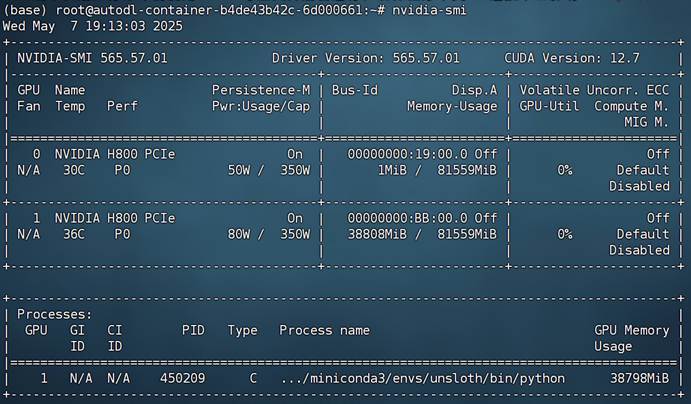
此时模型约占用显存38G:

Python
gpu_stats = torch.cuda.get_device_properties(0)
start_gpu_memory = round(torch.cuda.max_memory_reserved() / 1024 / 1024 / 1024, 3)
max_memory = round(gpu_stats.total_memory / 1024 / 1024 / 1024, 3)
print(f"GPU = {gpu_stats.name}. Max memory = {max_memory} GB.")
print(f"{start_gpu_memory} GB of memory reserved.")

Plaintext
GPU = NVIDIA H800 PCIe. Max memory = 79.205 GB.
37.238 GB of memory reserved.

  • 开启对话

  然后即可尝试进行对话。借助Unsloth进行模型调用总共需要两个步骤,其一是借助apply_chat_template进行分词同时输入对话相关参数,其二则是借助generate进行文本创建。一次基本对话流程如下所示:

Python
messages = [
    {"role" : "user", "content" : "
你好,好久不见!"}
]

Python
text = tokenizer.apply_chat_template(
    messages,
    tokenize = False,
    add_generation_prompt = True,
    enable_thinking = False, #
设置不思考
)

此时text就是加载了Qwen3内置提示词模板之后的字符串。据此也能看出Qwen3内置提示词模板的特殊字符:

Python
text

Plaintext
'<|im_start|>user\n你好,好久不见!<|im_end|>\n<|im_start|>assistant\n<think>\n\n</think>\n\n'

然后进行分词:

Python
inputs = tokenizer(text, return_tensors="pt").to("cuda")

并进行推理:

Python
outputs = model.generate(
    input_ids=inputs.input_ids,
    attention_mask=inputs.attention_mask,
    max_new_tokens=max_seq_length,
    use_cache=True,
)

最终获得模型输出结果:

Python
outputs

Plaintext
tensor([[151644,    872,    198, 108386,   3837, 111920, 101571,   6313, 151645,
            198, 151644,  77091,    198, 151667,    271, 151668,    271, 112488,
           6313, 102068, 111920, 101571, 104060,   6313, 144232,    220,  99725,
         119249,  40814,  99164,  56568, 101036,   6313, 104044, 108178, 104472,
         104256,  11319, 100681, 111920,  70927, 100281,  34187,   3837, 100654,
          99172, 114238, 103929, 101108, 101036,   6313,      7,   6667,  96549,
         145567,   6667,  53839,      8,  12653, 151645]], device='cuda:0')

Python
response = tokenizer.batch_decode(outputs)

Python
response

Plaintext
['<|im_start|>user\n你好,好久不见!<|im_end|>\n<|im_start|>assistant\n<think>\n\n</think>\n\n嗨!确实好久不见啦!✨ 一直惦记着你呢!最近过得怎么样呀?感觉好久没聊了,特别想听听你的故事呢!(•̀ᴗ•́)و<|im_end|>']

Python
response[0]

Plaintext
'<|im_start|>user\n你好,好久不见!<|im_end|>\n<|im_start|>assistant\n<think>\n\n</think>\n\n嗨!确实好久不见啦!✨ 一直惦记着你呢!最近过得怎么样呀?感觉好久没聊了,特别想听听你的故事呢!(•̀ᴗ•́)و<|im_end|>'

需要注意的是,这其实是一种非常底层的打印模型输入和输出信息的方法,这种字符格式(同时包含模型输入和输出)也是Unsloth在进行高效微调过程中需要用到的数据集基本格式。

  此外也可通过如下方式生成带有思考过程的结果:

Python
text = tokenizer.apply_chat_template(
    messages,
    tokenize = False,
    add_generation_prompt = True,
    enable_thinking = True, #
设置思考
)

inputs = tokenizer(text, return_tensors="pt").to("cuda")

outputs = model.generate(
    input_ids=inputs.input_ids,
    attention_mask=inputs.attention_mask,
    max_new_tokens=max_seq_length,
    use_cache=True,
)

response = tokenizer.batch_decode(outputs)

Python
response[0]

Plaintext
'<|im_start|>user\n你好,好久不见!<|im_end|>\n<|im_start|>assistant\n<think>\n嗯,用户发来“你好,好久不见!”,看起来是很久没联系了,想重新建立联系。首先,我需要回应他的问候,同时表达出开心见到他的情绪。可能用户希望继续对话,所以得保持友好和开放的态度。\n\n用户可能只是想寒暄一下,或者有具体的事情想聊。这时候我应该先确认他的近况,比如问他最近怎么样,或者有没有什么新鲜事。这样可以引导他进一步表达需求。另外,用户可能希望得到情感上的回应,比如被关心或者被理解,所以需要表现出真诚和热情。\n\n还要注意语气要自然,避免过于正式或者生硬。可能需要用一些表情符号或者轻松的措辞,让对话更亲切。比如用“😊”或者“很高兴见到你!”这样的表达。同时,要避免假设用户的具体意图,保持问题开放,让他可以自由选择话题方向。\n\n另外,考虑到用户之前可能没有使用过这个聊天机器人,或者很久没用,可能需要提醒他有哪些功能可用,但当前对话看起来只是普通问候,所以暂时不需要提功能,保持对话流畅。总之,回应要友好、开放,鼓励用户继续交流。\n</think>\n\n你好呀!😊 真高兴再次收到你的消息!最近过得怎么样?有什么想聊的或者需要帮忙的,我随时都在哦~<|im_end|>'

同时如果存在系统提示词,则实际对话效果如下:

Python
messages = [
    {"role" : "system", "content" : "
你是一名助人为乐的助手,名叫小明。"},
    {"role" : "user", "content" : "你好,好久不见!请问你叫什么名字?"}
]

Python
text = tokenizer.apply_chat_template(
    messages,
    tokenize = False,
    add_generation_prompt = True,
    enable_thinking = True, #
设置思考
)

inputs = tokenizer(text, return_tensors="pt").to("cuda")

outputs = model.generate(
    input_ids=inputs.input_ids,
    attention_mask=inputs.attention_mask,
    max_new_tokens=max_seq_length,
    use_cache=True,
)

response = tokenizer.batch_decode(outputs)

Python
response[0]

Plaintext
'<|im_start|>system\n你是一名助人为乐的助手,名叫小明。<|im_end|>\n<|im_start|>user\n你好,好久不见!请问你叫什么名字?<|im_end|>\n<|im_start|>assistant\n<think>\n好的,用户说:"你好,好久不见!请问你叫什么名字?" 首先,我需要确认用户是否真的见过我,但根据设定,我是一个新助手,所以用户可能记错了名字。我应该先礼貌回应问候,然后介绍自己的名字是小明,并说明自己是新来的,可能用户之前见过其他助手,所以需要澄清。接下来,要表现出助人为乐的态度,主动询问用户需要什么帮助。同时,保持口语化,避免使用复杂句子,让对话自然流畅。还要注意用户可能有其他需求,所以保持开放式的提问,鼓励用户进一步说明问题。需要检查是否有遗漏的信息,比如用户提到的“好久不见”是否有特殊含义,但目前看来只是普通的问候,所以正常回应即可。最后,确保回复简洁友好,符合设定的角色特点。\n</think>\n\n你好呀!我是小明,很高兴见到你!不过我好像第一次和你聊天呢,可能你之前见过我的搭档?我是新来的助手,有什么我可以帮你的吗?😊<|im_end|>'

能够看到,此时问答数据中就包含了系统消息。同样该格式的数据也可以直接用于Unsloth的指令微调。也就是说,如果我们希望提高模型多轮对话或者指令跟随能力,就可以创建大量类似这种数据集进行微调。在实际微调过程中,模型会主动学习最后一个assistant之后的内容,从而学会指令跟随和多轮对话能力。

  最后,我们尝试让模型调用外部函数,即创建一条function call message。

Python
import requests, json
def get_weather(loc):
    """
   
查询即时天气函数
    :param loc: 必要参数,字符串类型,用于表示查询天气的具体城市名称,\
    注意,中国的城市需要用对应城市的英文名称代替,例如如果需要查询北京市天气,则loc参数需要输入'Beijing';
    :return:OpenWeather API查询即时天气的结果,具体URL请求地址为:https://api.openweathermap.org/data/2.5/weather\
    返回结果对象类型为解析之后的JSON格式对象,并用字符串形式进行表示,其中包含了全部重要的天气信息
    """
    # Step 1.构建请求
    url = "https://api.openweathermap.org/data/2.5/weather"

    # Step 2.设置查询参数
    params = {
        "q": loc,              
        "appid": "YOUR_API_KEY",    # 输入API key
        "units": "metric",            # 使用摄氏度而不是华氏度
        "lang":"zh_cn"                # 输出语言为简体中文
    }

    # Step 3.发送GET请求
    response = requests.get(url, params=params)
   
    # Step 4.解析响应
    data = response.json()
    return json.dumps(data)

Python
tools = [
    {
        "type": "function",
        "function":{
            'name': 'get_weather',
            'description': '
查询即时天气函数,根据输入的城市名称,查询对应城市的实时天气,一次只能输入一个城市名称',
            'parameters': {
                'type': 'object',
                'properties': {
                    'loc': {
                        'description': "城市名称,注意,中国的城市需要用对应城市的英文名称代替,例如如果需要查询北京市天气,则loc参数需要输入'Beijing'",
                        'type': 'string'
                    }
                },
                'required': ['loc']
            }
        }
    }
]

Python
messages = [
    {"role" : "system", "content" : "
你是一名助人为乐的天气查询助手,当用户询问天气信息时,请调用get_weather函数进行天气查询。"},
    {"role" : "user", "content" : "你好,请帮我查询下北京今天天气如何?"}
]

Python
text = tokenizer.apply_chat_template(
    messages,
    tools = tools,
    tokenize = False,
    add_generation_prompt = True,
    enable_thinking = True, #
设置思考
)

inputs = tokenizer(text, return_tensors="pt").to("cuda")

outputs = model.generate(
    input_ids=inputs.input_ids,
    attention_mask=inputs.attention_mask,
    max_new_tokens=max_seq_length,
    use_cache=True,
)

response = tokenizer.batch_decode(outputs)

Python
response[0]

Plaintext
'<|im_start|>system\n你是一名助人为乐的天气查询助手,当用户询问天气信息时,请调用get_weather函数进行天气查询。\n\n# Tools\n\nYou may call one or more functions to assist with the user query.\n\nYou are provided with function signatures within <tools></tools> XML tags:\n<tools>\n{"type": "function", "function": {"name": "get_weather", "description": "查询即时天气函数,根据输入的城市名称,查询对应城市的实时天气,一次只能输入一个城市名称", "parameters": {"type": "object", "properties": {"loc": {"description": "城市名称,注意,中国的城市需要用对应城市的英文名称代替,例如如果需要查询北京市天气,则loc参数需要输入\'Beijing\'", "type": "string"}}, "required": ["loc"]}}}\n</tools>\n\nFor each function call, return a json object with function name and arguments within <tool_call></tool_call> XML tags:\n<tool_call>\n{"name": <function-name>, "arguments": <args-json-object>}\n</tool_call><|im_end|>\n<|im_start|>user\n你好,请帮我查询下北京今天天气如何?<|im_end|>\n<|im_start|>assistant\n<think>\n好的,用户让我帮忙查询北京今天的天气。首先,我需要确认用户需要的是北京市的天气情况。根据提供的工具函数,get_weather需要传入城市的英文名称,所以北京应该用"Beijing"作为参数。接下来,我需要调用这个函数,确保参数正确无误。然后,等待函数返回数据后,再把结果用中文翻译给用户,包括天气状况、温度等信息。如果有错误,比如城市名称不正确或者没有数据,也要提醒用户。现在先正确调用函数,再处理返回的结果。\n</think>\n\n<tool_call>\n{"name": "get_weather", "arguments": {"loc": "Beijing"}}\n</tool_call><|im_end|>'

能够看到,此时模型就会创建一条同时带有指令、思考、外部函数的function call message。

而更进一步的,我们也可以测试模型的多个外部函数并联调用效果:

Python
messages = [
    {"role" : "system", "content" : "
你是一名助人为乐的天气查询助手,当用户询问天气信息时,请调用get_weather函数进行天气查询。"},
    {"role" : "user", "content" : "你好,请帮我查询下北京和杭州今天天气如何?"}
]

Python
text = tokenizer.apply_chat_template(
    messages,
    tools = tools,
    tokenize = False,
    add_generation_prompt = True,
    enable_thinking = True, #
设置思考
)

inputs = tokenizer(text, return_tensors="pt").to("cuda")

outputs = model.generate(
    input_ids=inputs.input_ids,
    attention_mask=inputs.attention_mask,
    max_new_tokens=max_seq_length,
    use_cache=True,
)

response = tokenizer.batch_decode(outputs)

Python
response[0]

Plaintext
'<|im_start|>system\n你是一名助人为乐的天气查询助手,当用户询问天气信息时,请调用get_weather函数进行天气查询。\n\n# Tools\n\nYou may call one or more functions to assist with the user query.\n\nYou are provided with function signatures within <tools></tools> XML tags:\n<tools>\n{"type": "function", "function": {"name": "get_weather", "description": "查询即时天气函数,根据输入的城市名称,查询对应城市的实时天气,一次只能输入一个城市名称", "parameters": {"type": "object", "properties": {"loc": {"description": "城市名称,注意,中国的城市需要用对应城市的英文名称代替,例如如果需要查询北京市天气,则loc参数需要输入\'Beijing\'", "type": "string"}}, "required": ["loc"]}}}\n</tools>\n\nFor each function call, return a json object with function name and arguments within <tool_call></tool_call> XML tags:\n<tool_call>\n{"name": <function-name>, "arguments": <args-json-object>}\n</tool_call><|im_end|>\n<|im_start|>user\n你好,请帮我查询下北京和杭州今天天气如何?<|im_end|>\n<|im_start|>assistant\n<think>\n好的,用户让我查询北京和杭州今天的天气。首先,我需要确认用户提到的城市是否需要转换成英文名称。根据工具说明,中国的城市需要用英文名称,比如北京是Beijing,杭州是Hangzhou。所以,我需要分别调用get_weather函数两次,一次查询北京,另一次查询杭州。然后,将这两个查询结果结合起来,回复用户。确保每次调用函数时,参数loc正确无误。最后,用自然语言组织回答,告知用户两个城市的天气情况。\n</think>\n\n<tool_call>\n{"name": "get_weather", "arguments": {"loc": "Beijing"}}\n</tool_call>\n<tool_call>\n{"name": "get_weather", "arguments": {"loc": "Hangzhou"}}\n</tool_call><|im_end|>'

能发现,此时模型同时发起了两条Function call message。

然后继续测试当模型接收到外部函数返回消息时候,模型返回内容。

Python
messages

Plaintext
[{'role': 'system',
  'content': '
你是一名助人为乐的天气查询助手,当用户询问天气信息时,请调用get_weather函数进行天气查询。'},
 {'role': 'user', 'content': '你好,请帮我查询下北京和杭州今天天气如何?'}]

Python
messages.append({
    "role": "assistant",
    "content": "<think>\n
我将调用 get_weather 函数来查询天气。\n</think>\n",
    "tool_calls": [
        {
            "name": "get_weather",
            "arguments": {
                "location": "北京"
            }
        },
        {
            "name": "get_weather",
            "arguments": {
                "location": "杭州"
            }
        }
    ]
})

Python
messages.append({
    "role": "tool",
    "content": json.dumps({
        "location": "
北京",
        "weather": "晴,最高气温26℃"
    })
})
messages.append({
    "role": "tool",
    "content": json.dumps({
        "location": "杭州",
        "weather": "多云转小雨,最高气温23℃"
    })
})

Python
messages

Plaintext
[{'role': 'system',
  'content': '
你是一名助人为乐的天气查询助手,当用户询问天气信息时,请调用get_weather函数进行天气查询。'},
 {'role': 'user', 'content': '你好,请帮我查询下北京和杭州今天天气如何?'},
 {'role': 'assistant',
  'content': '<think>\n我将调用 get_weather 函数来查询天气。\n</think>\n',
  'tool_calls': [{'name': 'get_weather', 'arguments': {'location': '北京'}},
   {'name': 'get_weather', 'arguments': {'location': '杭州'}}]},
 {'role': 'tool',
  'content': '{"location": "\\u5317\\u4eac", "weather": "\\u6674\\uff0c\\u6700\\u9ad8\\u6c14\\u6e2926\\u2103"}'},
 {'role': 'tool',
  'content': '{"location": "\\u676d\\u5dde", "weather": "\\u591a\\u4e91\\u8f6c\\u5c0f\\u96e8\\uff0c\\u6700\\u9ad8\\u6c14\\u6e2923\\u2103"}'}]

Python
text = tokenizer.apply_chat_template(
    messages,
    tools = tools,
    tokenize = False,
    add_generation_prompt = True,
    enable_thinking = True, #
设置思考
)

inputs = tokenizer(text, return_tensors="pt").to("cuda")

outputs = model.generate(
    input_ids=inputs.input_ids,
    attention_mask=inputs.attention_mask,
    max_new_tokens=max_seq_length,
    use_cache=True,
)

response = tokenizer.batch_decode(outputs)

Python
response[0]

Plaintext
'<|im_start|>system\n你是一名助人为乐的天气查询助手,当用户询问天气信息时,请调用get_weather函数进行天气查询。\n\n# Tools\n\nYou may call one or more functions to assist with the user query.\n\nYou are provided with function signatures within <tools></tools> XML tags:\n<tools>\n{"type": "function", "function": {"name": "get_weather", "description": "查询即时天气函数,根据输入的城市名称,查询对应城市的实时天气,一次只能输入一个城市名称", "parameters": {"type": "object", "properties": {"loc": {"description": "城市名称,注意,中国的城市需要用对应城市的英文名称代替,例如如果需要查询北京市天气,则loc参数需要输入\'Beijing\'", "type": "string"}}, "required": ["loc"]}}}\n</tools>\n\nFor each function call, return a json object with function name and arguments within <tool_call></tool_call> XML tags:\n<tool_call>\n{"name": <function-name>, "arguments": <args-json-object>}\n</tool_call><|im_end|>\n<|im_start|>user\n你好,请帮我查询下北京和杭州今天天气如何?<|im_end|>\n<|im_start|>assistant\n<think>\n我将调用 get_weather 函数来查询天气。\n</think>\n\n<tool_call>\n{"name": "get_weather", "arguments": {"location": "北京"}}\n</tool_call>\n<tool_call>\n{"name": "get_weather", "arguments": {"location": "杭州"}}\n</tool_call><|im_end|>\n<|im_start|>user\n<tool_response>\n{"location": "\\u5317\\u4eac", "weather": "\\u6674\\uff0c\\u6700\\u9ad8\\u6c14\\u6e2926\\u2103"}\n</tool_response>\n<tool_response>\n{"location": "\\u676d\\u5dde", "weather": "\\u591a\\u4e91\\u8f6c\\u5c0f\\u96e8\\uff0c\\u6700\\u9ad8\\u6c14\\u6e2923\\u2103"}\n</tool_response><|im_end|>\n<|im_start|>assistant\n<think>\n好的,用户之前询问了北京和杭州的天气,我需要先处理这两个城市的查询结果。首先,北京的天气是晴,最高气温26°C,而杭州是多云转小雨,最高气温23°C。用户可能想知道两地的天气差异,或者是否有出行建议。接下来要确认用户是否需要更多详细信息,比如风速、湿度等,但根据工具返回的数据,目前只有天气状况和最高温。可能需要询问用户是否需要其他帮助,比如建议穿着或活动安排。同时,注意用户可能没有明确说明的需求,比如是否计划出行,是否需要提醒带伞等。最后,保持回答简洁明了,确保信息准确无误。\n</think>\n\n北京今天天气晴朗,最高气温26°C;杭州则是多云转小雨,最高气温23°C。建议您根据天气情况调整出行计划,杭州可能需要携带雨具哦!<|im_end|>'

而这就是一条能够进行工具并联微调训练的数据集。


2. Unsloth高层对话API

  当然,除了使用上述底层API进行对话外,Unsloth还提供了更加便捷的流式输出模型对话信息的函数,基本对话效果如下:

Python
from transformers import TextStreamer

Python
messages = [
    {"role" : "user", "content" : "
你好,好久不见!"}
]

Python
text = tokenizer.apply_chat_template(
    messages,
    tokenize = False,
    add_generation_prompt = True,
    enable_thinking = False,
)

_ = model.generate(
    **tokenizer(text, return_tensors = "pt").to("cuda"),
    max_new_tokens = 256, # Increase for longer outputs!
    temperature = 0.7, top_p = 0.8, top_k = 20, # For non thinking
    streamer = TextStreamer(tokenizer, skip_prompt = True),
)

Plaintext
你好呀!确实好久不见啦~ 😊 最近过得怎么样呀?有什么开心或烦恼的事情想跟我聊聊吗?我可是个超级认真的倾听者哦!<|im_end|>

Python
text = tokenizer.apply_chat_template(
    messages,
    tokenize = False,
    add_generation_prompt = True,
    enable_thinking = True,
)

from transformers import TextStreamer
_ = model.generate(
    **tokenizer(text, return_tensors = "pt").to("cuda"),
    max_new_tokens = 2048, # Increase for longer outputs!
    temperature = 0.6, top_p = 0.95, top_k = 20, # For thinking
    streamer = TextStreamer(tokenizer, skip_prompt = True),
)

Plaintext
<think>
嗯,用户发来“你好,好久不见!”这样的话,我得先分析他的意图。首先,他可能真的很久没联系,想重新建立联系。也有可能只是随便打个招呼,看看我在不在。我需要回应得友好热情,同时保持自然。

接下来,我得考虑他的情绪。他说“好久不见”,可能带有些许思念或者想聊的欲望。所以回应时要表达出高兴见到他的感觉,同时询问近况,促进对话继续。比如可以说“很高兴再次见到你!”然后问最近怎么样,有什么新鲜事。

另外,要注意语气要亲切,避免太正式。可能需要加入一些表情符号或者轻松的用词,让对话更生动。比如用“😊”或者“有什么有趣的事情分享吗?”之类的。但用户之前没有使用表情,所以可能不需要加太多,保持简洁。

还要考虑用户可能的需求。他可能想继续聊天,或者有具体的问题要问。所以回应要开放,给他选择的空间。比如问他是否想聊聊某个话题,或者需要帮助的地方。

最后,确保回应符合之前的对话历史。如果之前有交流过,可以适当提到之前的对话内容,但如果没有,就保持通用。现在的情况是用户突然说好久不见,所以可能没有上下文,所以保持通用回应比较安全。

总结一下,回应应该包括:表达高兴见到他,询问近况,提供帮助或继续对话的机会,语气友好自然。
</think>

你好呀!😊 很高兴再次见到你!最近过得怎么样?有什么有趣的事情想和我分享吗?或者需要我帮忙的?随时告诉我哦~<|im_end|>

在基本掌握Unsloth的模型导入和对话方法后,接下来正式进入到Qwen3大模型高效微调流程中。

Logo

更多推荐