
MobaXterm上部署Atom7B模型以及微调
·
一、配置环境
1.下载源文件
LlamaChinese开源地址
git clone https://github.com/LlamaFamily/Llama-ChineseLlamaFamily/Llama-Chinese: Llama中文社区,实时汇总最新Llama学习资料,构建最好的中文Llama大模型开源生态,完全开源可商用
Atom7B模型下载地址
https://huggingface.co/FlagAlpha/Atom-7B-Chat
注:也可以使用huggingface镜像网站FlagAlpha/Atom-7B-Chat · HF Mirror
模型下载方式:
参考如何将 huggingface上的模型文件下载到本地_huggingface下载模型到本地-CSDN博客
下载结束服务器上应该有Llama-Chinese 和Atom7Bchat两个文件
2.部署conda环境
conda环境的部署非常重要,关系到后续install flashattn等包匹配问题
conda create -n atom7b python=3.10
conda activate atom7b
这里使用的cuda版本是12.1 ,torch版本是2.5.1,可以成功运行,
cuda版本太高,在安装包的时候会发生报错
  Building wheel for flash_attn (setup.py) ... error
  error: subprocess-exited-with-error

  × python setup.py bdist_wheel did not run successfully.
  │ exit code: 1
  ╰─> [275 lines of output]


      torch.__version__  = 2.1.2+cu121


      /home/lyx/.conda/envs/llama7bCH/lib/python3.10/site-packages/setuptools/__init__.py:94: _DeprecatedInstaller: setuptools.installer and fetch_build_eggs are deprecated.
      !!

              ********************************************************************************
              Requirements should be satisfied by a PEP 517 installer.
              If you are using pip, you can try pip install --use-pep517.
              ********************************************************************************

      !!
        dist.fetch_build_eggs(dist.setup_requires)
      /home/lyx/.conda/envs/llama7bCH/lib/python3.10/site-packages/setuptools/dist.py:759: SetuptoolsDeprecationWarning: License classifiers are deprecated.
      !!

              ********************************************************************************
              Please consider removing the following classifiers in favor of a SPDX license expression:

              License :: OSI Approved :: BSD License

              See https://packaging.python.org/en/latest/guides/writing-pyproject-toml/#license for details.
              ********************************************************************************

      !!
        self._finalize_license_expression()
      running bdist_wheel
      Guessing wheel URL:  https://github.com/Dao-AILab/flash-attention/releases/download/v2.7.4.post1/flash_attn-2.7.4.post1+cu12torch2.1cxx11abiFALSE-cp310-cp310-linux_x86_64.whl
     packages/torch/utils/cpp_extension.py", line 2116, in _run_ninja_build
          raise RuntimeError(message) from e
      RuntimeError: Error compiling objects for extension
      [end of output]

  note: This error originates from a subprocess, and is likely not a problem with pip.
  ERROR: Failed building wheel for flash_attn
  Running setup.py clean for flash_attn
Failed to build flash_attn
ERROR: Failed to build installable wheels for some pyproject.toml based projects (flash_attn)
第一次安装flashattn发生报错,原因是安装的2.7几版本不匹配
这里换成2.6.3后成功安装
pip install flash-attn==2.6.3
配置环境
cd Llama-Chinese
pip install -r requirements.txt
二、运行quick_start.py测试效果
由于网络原因一般直接从hg官网下载模型失败,可以采用本地Atom7Bchat文件下训练,新建一个python文件命名为quick_start.py
import torch
from transformers import AutoTokenizer, AutoModelForCausalLM
device_map = "cuda:0" if torch.cuda.is_available() else "auto"
model = AutoModelForCausalLM.from_pretrained('FlagAlpha/Atom-7B-Chat',device_map=device_map,torch_dtype=torch.float16,load_in_8bit=True,trust_remote_code=True,use_flash_attention_2=True)
#此处'FlagAlpha/Atom-7B-Chat'改为本地Atom7Bchat文件路径
model =model.eval()
tokenizer = AutoTokenizer.from_pretrained('FlagAlpha/Atom-7B-Chat',use_fast=False)
#同理,此处'FlagAlpha/Atom-7B-Chat'改为本地Atom7Bchat文件路径
tokenizer.pad_token = tokenizer.eos_token
input_ids = tokenizer(['<s>Human: 介绍一下中国\n</s><s>Assistant: '], return_tensors="pt",add_special_tokens=False).input_ids
if torch.cuda.is_available():
  input_ids = input_ids.to('cuda')
generate_input = {
    "input_ids":input_ids,
    "max_new_tokens":512,
    "do_sample":True,
    "top_k":50,
    "top_p":0.95,
    "temperature":0.3,
    "repetition_penalty":1.3,
    "eos_token_id":tokenizer.eos_token_id,
    "bos_token_id":tokenizer.bos_token_id,
    "pad_token_id":tokenizer.pad_token_id
}
generate_ids  = model.generate(**generate_input)
text = tokenizer.decode(generate_ids[0])
print(text)
保存文件并运行
python quick_start.py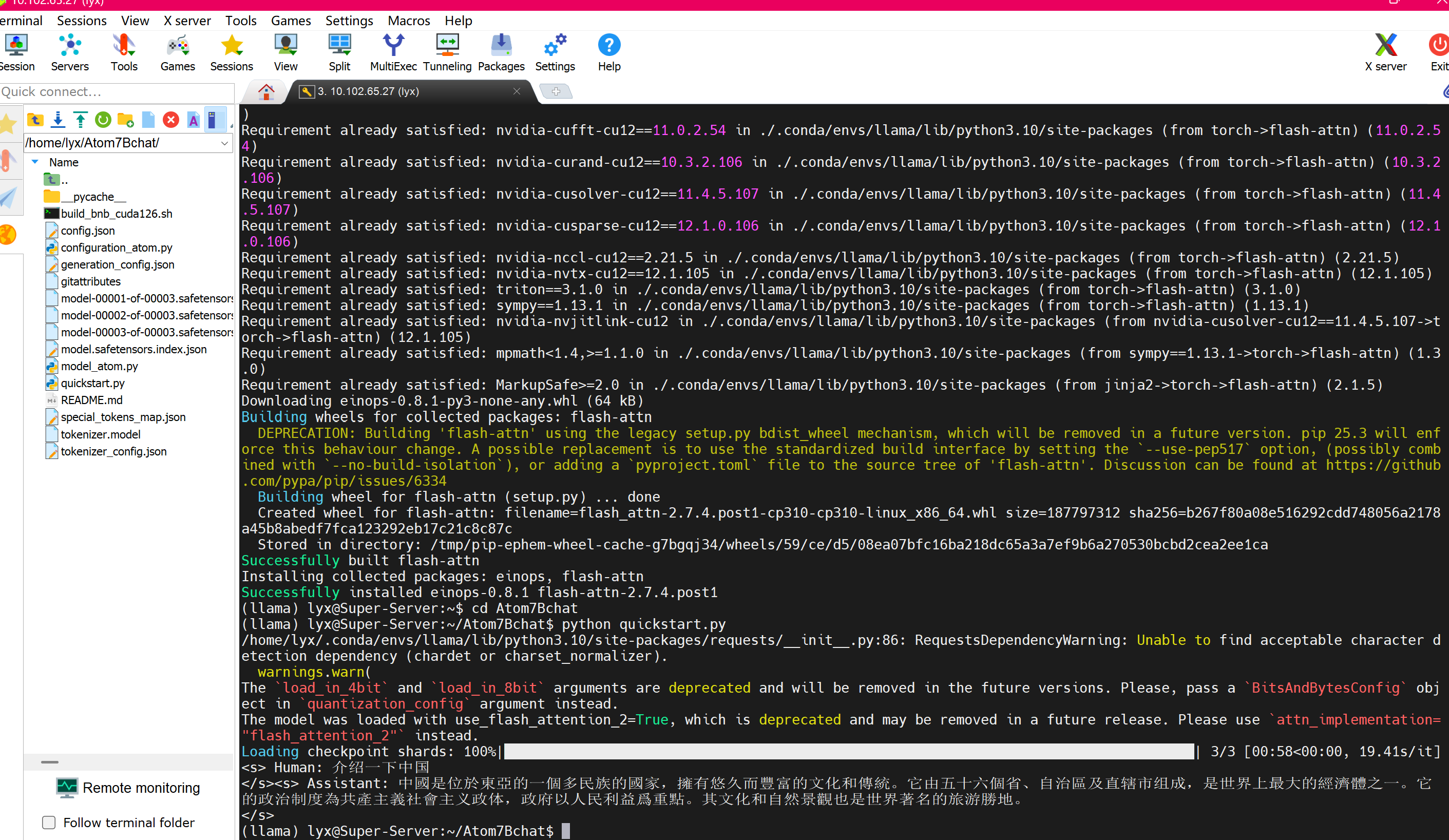
结果如图片显示,运行成功
三、本机Gradio框架嵌套Atom7B部署
利用Llama-Chinese/examples文件夹下面的chat_gradio.py,代码如图:
import gradio as gr
import time
from transformers import AutoTokenizer, AutoModelForCausalLM,TextIteratorStreamer
from threading import Thread
import torch,sys,os
import json
import pandas
import argparse

with gr.Blocks() as demo:
    gr.Markdown("""<h1><center>智能助手</center></h1>""")
    chatbot = gr.Chatbot()
    msg = gr.Textbox()
    state = gr.State()
    with gr.Row():
        clear = gr.Button("新话题")
        re_generate = gr.Button("重新回答")
        sent_bt = gr.Button("发送")
    with gr.Accordion("生成参数", open=False):
        slider_temp = gr.Slider(minimum=0, maximum=1, label="temperature", value=0.3)
        slider_top_p = gr.Slider(minimum=0.5, maximum=1, label="top_p", value=0.95)
        slider_context_times = gr.Slider(minimum=0, maximum=5, label="上文轮次", value=0,step=2.0)
    def user(user_message, history):
        return "", history + [[user_message, None]]
    def bot(history,temperature,top_p,slider_context_times):
        if pandas.isnull(history[-1][1])==False:
            history[-1][1] = None
            yield history
        slider_context_times = int(slider_context_times)
        history_true = history[1:-1]
        prompt = ''
        if slider_context_times>0:
            prompt += '\n'.join([("<s>Human: "+one_chat[0].replace('<br>','\n')+'\n</s>' if one_chat[0] else '')  +"<s>Assistant: "+one_chat[1].replace('<br>','\n')+'\n</s>'    for one_chat in history_true[-slider_context_times:] ])
        prompt +=  "<s>Human: "+history[-1][0].replace('<br>','\n')+"\n</s><s>Assistant:"
        input_ids = tokenizer([prompt], return_tensors="pt",add_special_tokens=False).input_ids[:,-512:].to('cuda')
        generate_input = {
            "input_ids":input_ids,
            "max_new_tokens":512,
            "do_sample":True,
            "top_k":50,
            "top_p":top_p,
            "temperature":temperature,
            "repetition_penalty":1.3,
            "streamer":streamer,
            "eos_token_id":tokenizer.eos_token_id,
            "bos_token_id":tokenizer.bos_token_id,
            "pad_token_id":tokenizer.pad_token_id
        }
        thread = Thread(target=model.generate, kwargs=generate_input)
        thread.start()
        start_time = time.time()
        bot_message =''
        print('Human:',history[-1][0])
        print('Assistant: ',end='',flush=True)
        for new_text in streamer:
            print(new_text,end='',flush=True)
            if len(new_text)==0:
                continue
            if new_text!='</s>':
                bot_message+=new_text
            if 'Human:' in bot_message:
                bot_message = bot_message.split('Human:')[0]
            history[-1][1] = bot_message
            yield history
        end_time =time.time()
        print()
        print('生成耗时:',end_time-start_time,'文字长度:',len(bot_message),'字耗时:',(end_time-start_time)/len(bot_message))

    msg.submit(user, [msg, chatbot], [msg, chatbot], queue=False).then(
        bot, [chatbot,slider_temp,slider_top_p,slider_context_times], chatbot
    )
    sent_bt.click(user, [msg, chatbot], [msg, chatbot], queue=False).then(
        bot, [chatbot,slider_temp,slider_top_p,slider_context_times], chatbot
    )
    re_generate.click( bot, [chatbot,slider_temp,slider_top_p,slider_context_times], chatbot )
    clear.click(lambda: [], None, chatbot, queue=False)

if __name__ == "__main__":
    parser = argparse.ArgumentParser()
    parser.add_argument("--model_name_or_path", type=str, help='mode name or path')
    parser.add_argument("--is_4bit", action='store_true', help='use 4bit model')
    args = parser.parse_args()
    tokenizer = AutoTokenizer.from_pretrained(args.model_name_or_path,use_fast=False)
    tokenizer.pad_token = tokenizer.eos_token
    if args.is_4bit==False:
        model = AutoModelForCausalLM.from_pretrained(args.model_name_or_path,
                                                     device_map='cuda:0' if torch.cuda.is_available() else "auto",
                                                     torch_dtype=torch.float16,
                                                     load_in_8bit=True,
                                                     trust_remote_code=True,
                                                     use_flash_attention_2=True)
        model.eval()
    else:
        from auto_gptq import AutoGPTQForCausalLM
        model = AutoGPTQForCausalLM.from_quantized(args.model_name_or_path,low_cpu_mem_usage=True, device="cuda:0", use_triton=False,inject_fused_attention=False,inject_fused_mlp=False)
    streamer = TextIteratorStreamer(tokenizer,skip_prompt=True)
    if torch.__version__ >= "2" and sys.platform != "win32":
        model = torch.compile(model)
    demo.queue().launch(share=False, debug=True,server_name="0.0.0.0")
运行py文件
python examples/chat_gradio.py --model_name_or_path ../Atom7Bchat结果如下图所示
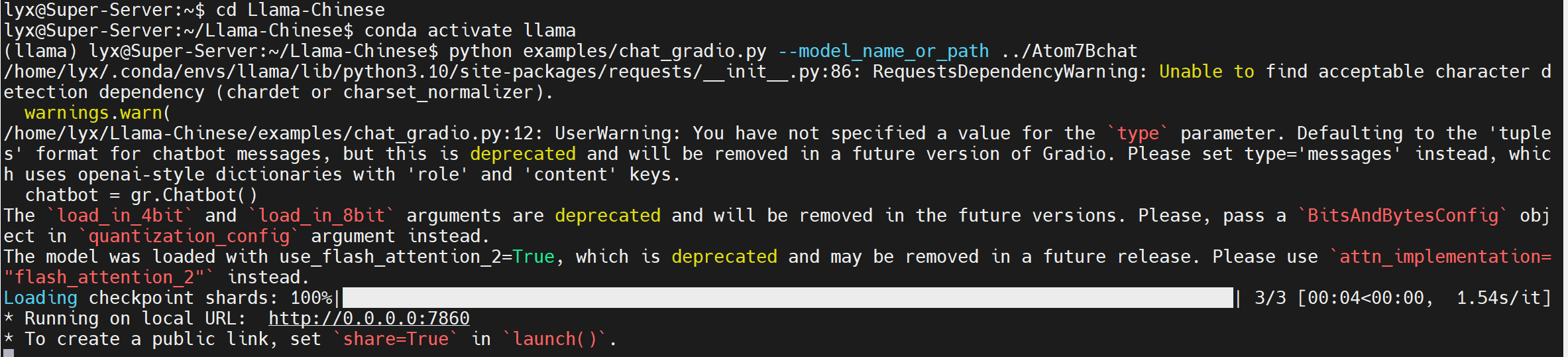
打开一台电脑的终端 ,参考本地端口转发,SSH 端口转发 - SSH 教程 - 网道 https://wangdoc.com/ssh/port-forwarding
输入命令
ssh -L 7860:localhost:7860 用户名 @ 服务器地址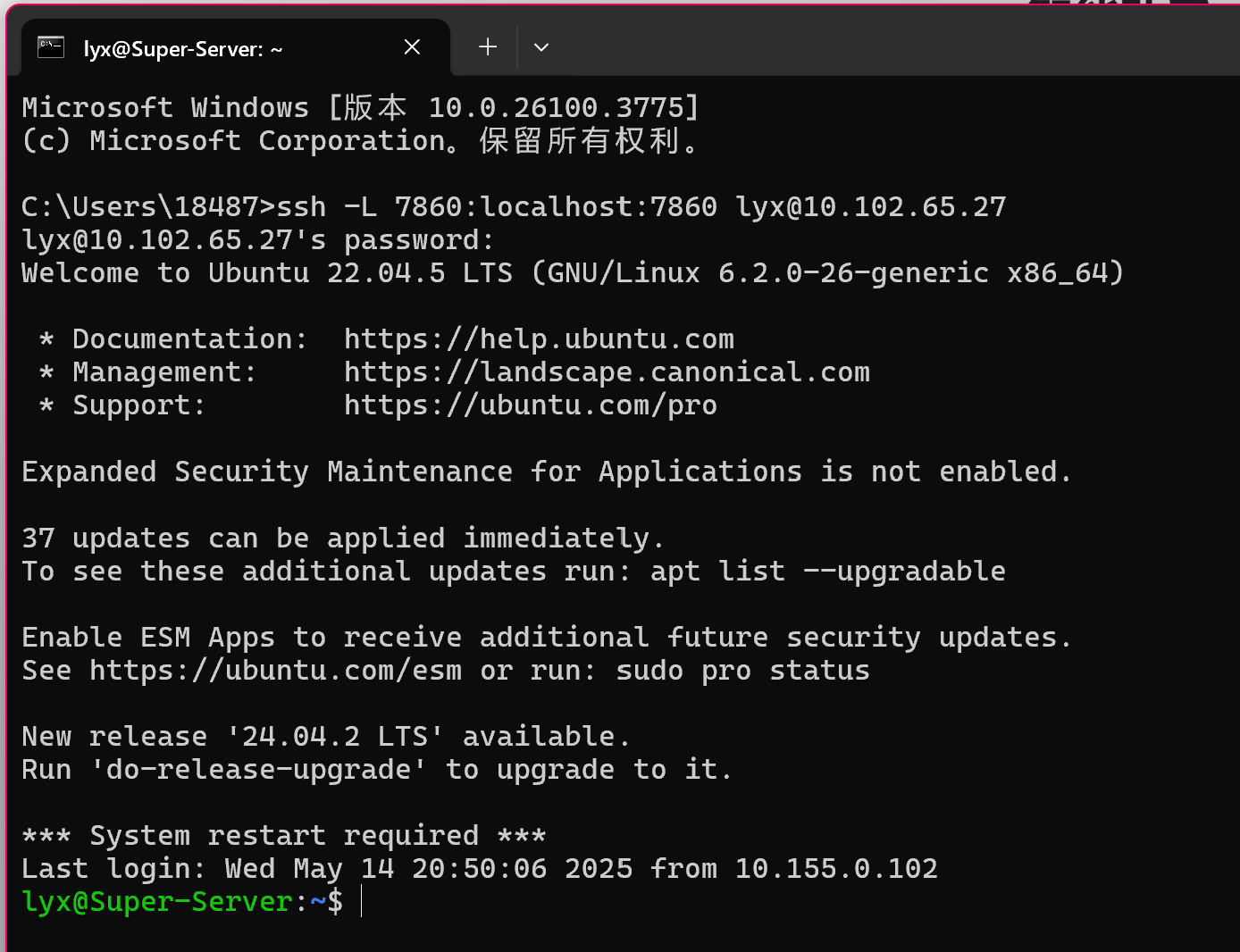
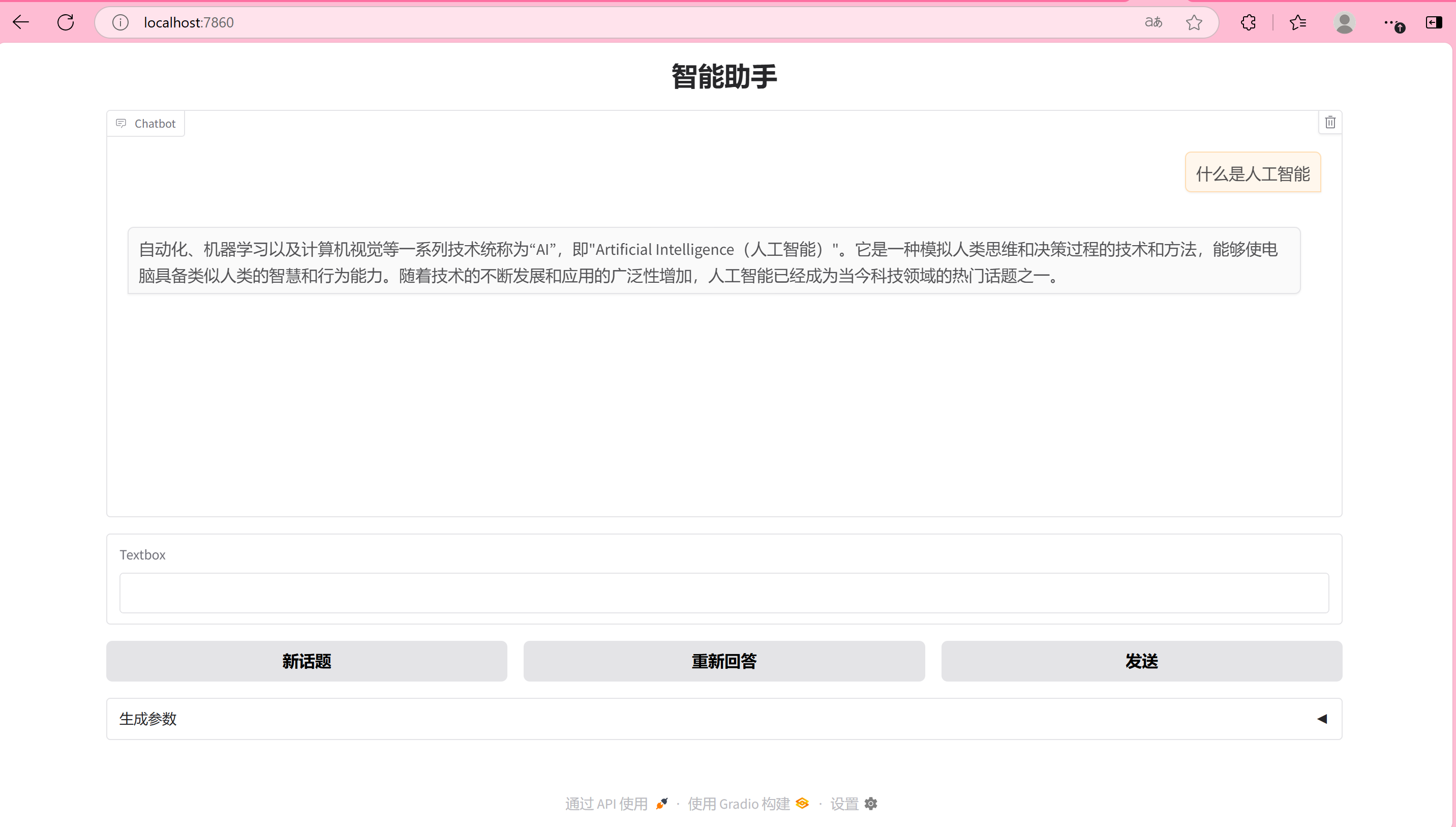
在电脑浏览器输入地址

运行成功
更多推荐
 13
13 0
0- 0


 已为社区贡献1条内容

所有评论(0)