
数学中“参数微调,形态巨变”的美妙特性
·
前言
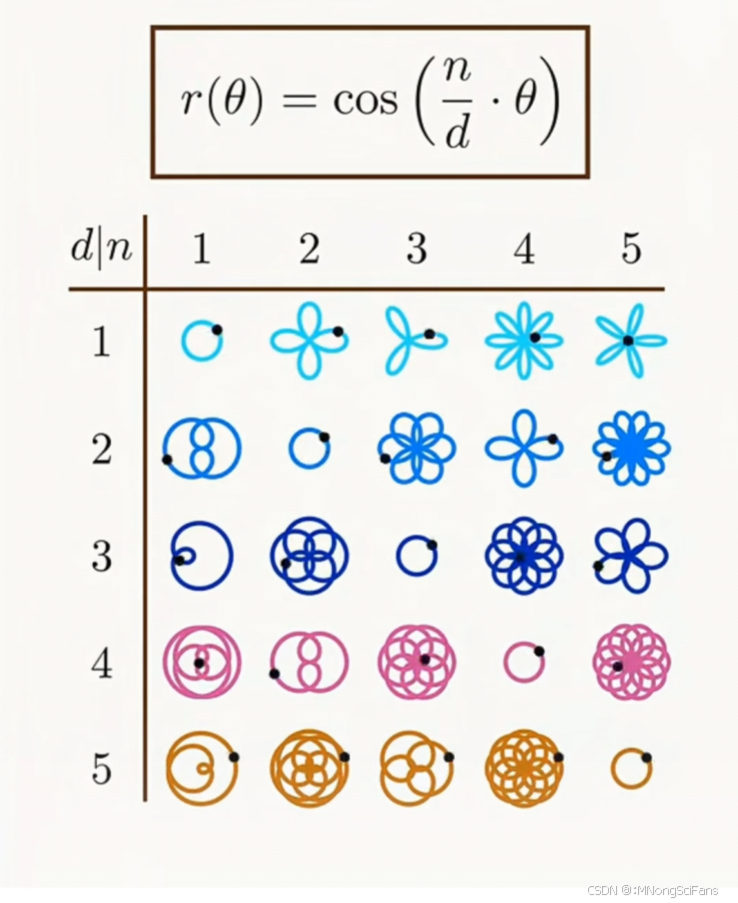
极坐标玫瑰线(Polar Rose Curve)的数学原理与美学特性,完美融合了数学严谨性与艺术表现力。通过参数化设计,揭示了简单公式背后复杂的几何行为,体现了数学中“参数微调,形态巨变”的美妙特性。
1. 数学公式解析
核心公式: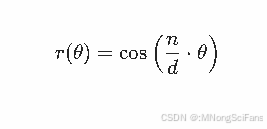
- 变量含义:
- r:极径(点到原点的距离)
- theta:极角(与参考轴的夹角)
- n, d:整数参数,控制花瓣数量与形状。
数学意义:
该公式通过余弦函数调制极径,参数 n,d 决定了曲线的对称性和周期性。当 theta 在 [0, pi/2] 范围内变化时,n,d 的比值直接影响花瓣的重复模式。
2. 图形参数化分析(表格部分)
表格通过 d:n 的组合(d 取值 1–5,n 动态变化)展示不同玫瑰线形态:
| d | 图形特征 | 数学规律 |
|---|---|---|
| d=1 | 单瓣→五瓣(红色) | n 直接等于花瓣数(n=1 单瓣,n=5 五瓣)。 |
| d=2 | 双瓣与四瓣(橙色) | 若 n 为奇数(如 n=1),图形需 theta in [0, pi/4] 闭合。 |
| d=3 | 单瓣与三瓣(黄色) | 花瓣数取决于 n与 d 的约分结果(如 n=3 简化为 1:1,单瓣)。 |
| d=4 | 双瓣与四瓣(绿色) | 类似 d=2,但周期更复杂(如 n=1 需 pi/8闭合)。 |
| d=5 | 五瓣为主(蓝色) | 花瓣数多为 5,但若 n 与 5 有公约数(如 n=2),花瓣数减少。 |
关键规律:
- 花瓣数 = n 与 d 的最大公约数(GCD)的某种映射(需结合具体参数分析)。
- 闭合周期:当 n,d 为有理数时,曲线闭合;若为无理数,则无限填充环形区域。
3. 可视化设计意图
- 色彩编码:不同 d 值对应不同颜色(红→蓝),便于区分参数组。
- 中心白点:强调极坐标原点,辅助观察花瓣的对称性与极径变化。
- 背景对比:黑色背景凸显彩色曲线,增强视觉冲击力。
4. 应用与扩展
- 数学教育:直观演示参数对图形的影响,适合极坐标教学。
- 艺术设计:玫瑰线可用于生成对称图案(如LOGO、装饰纹样)。
- 科学建模:类似曲线可描述花瓣生长、声波振动等自然现象。
5. WEB 3D
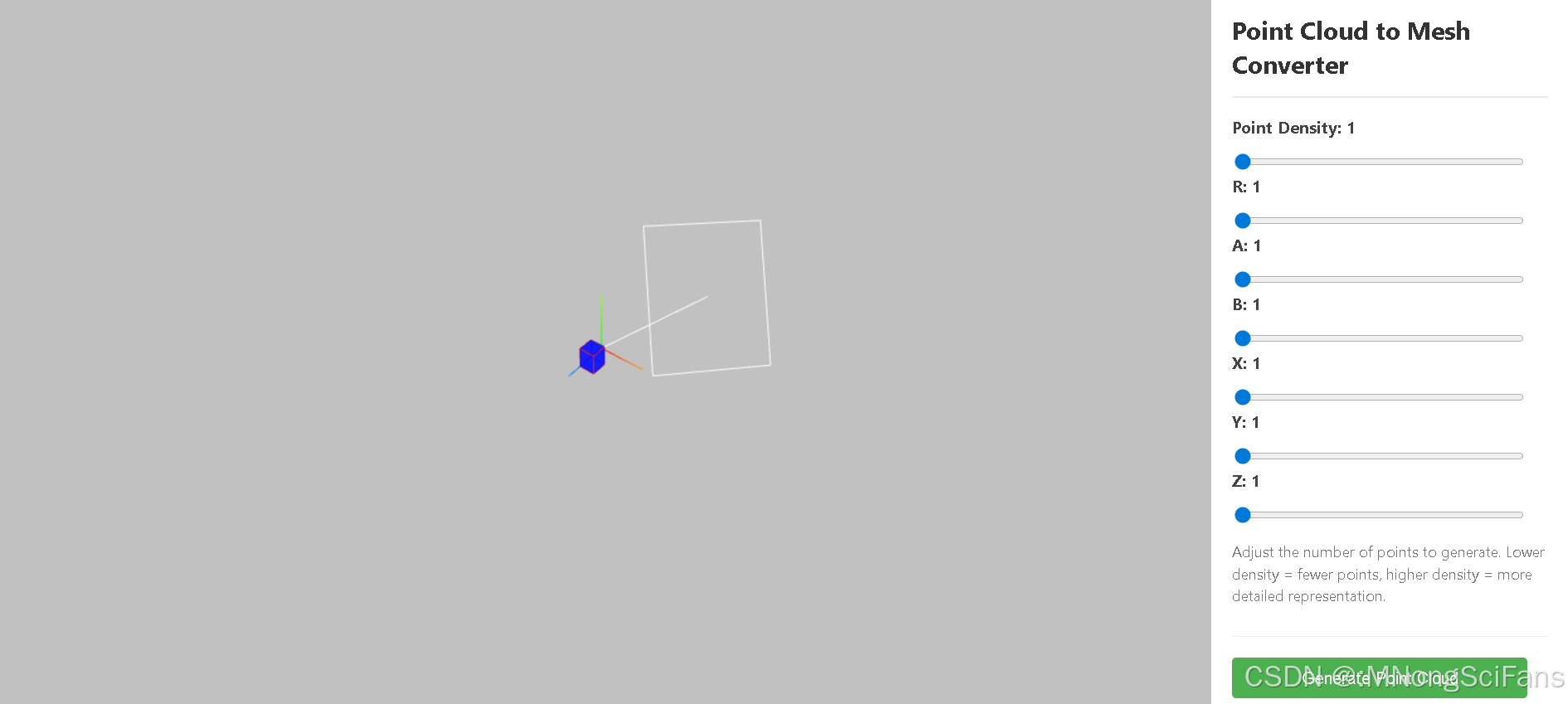
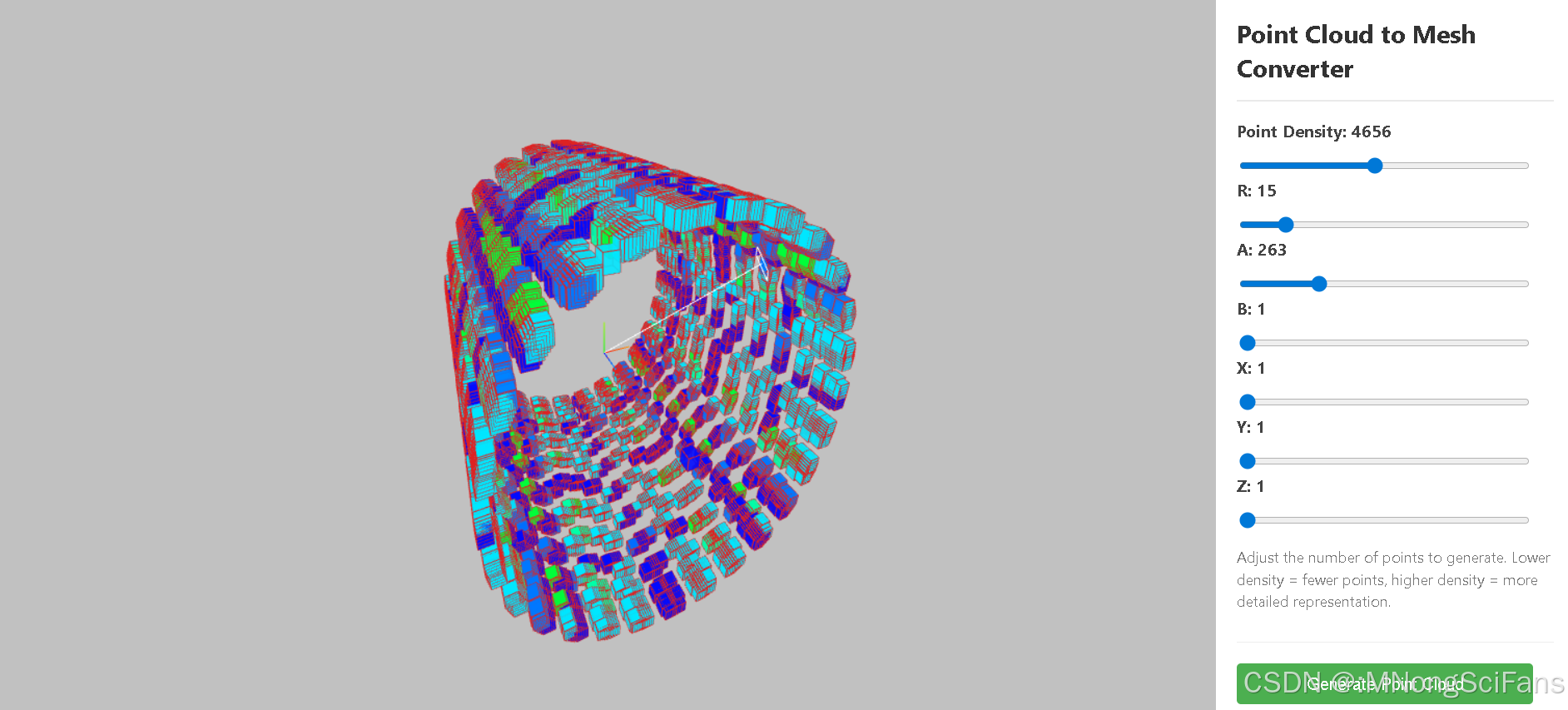
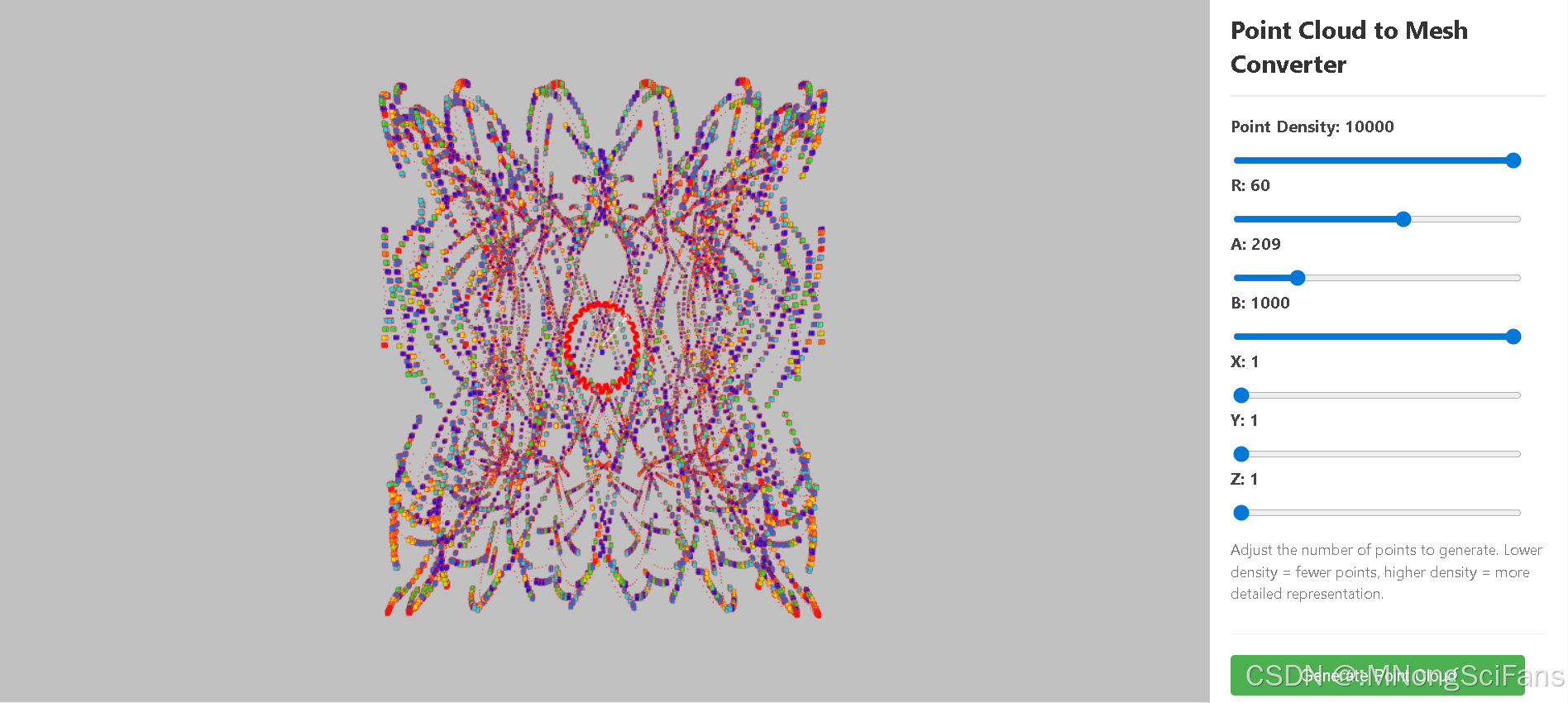
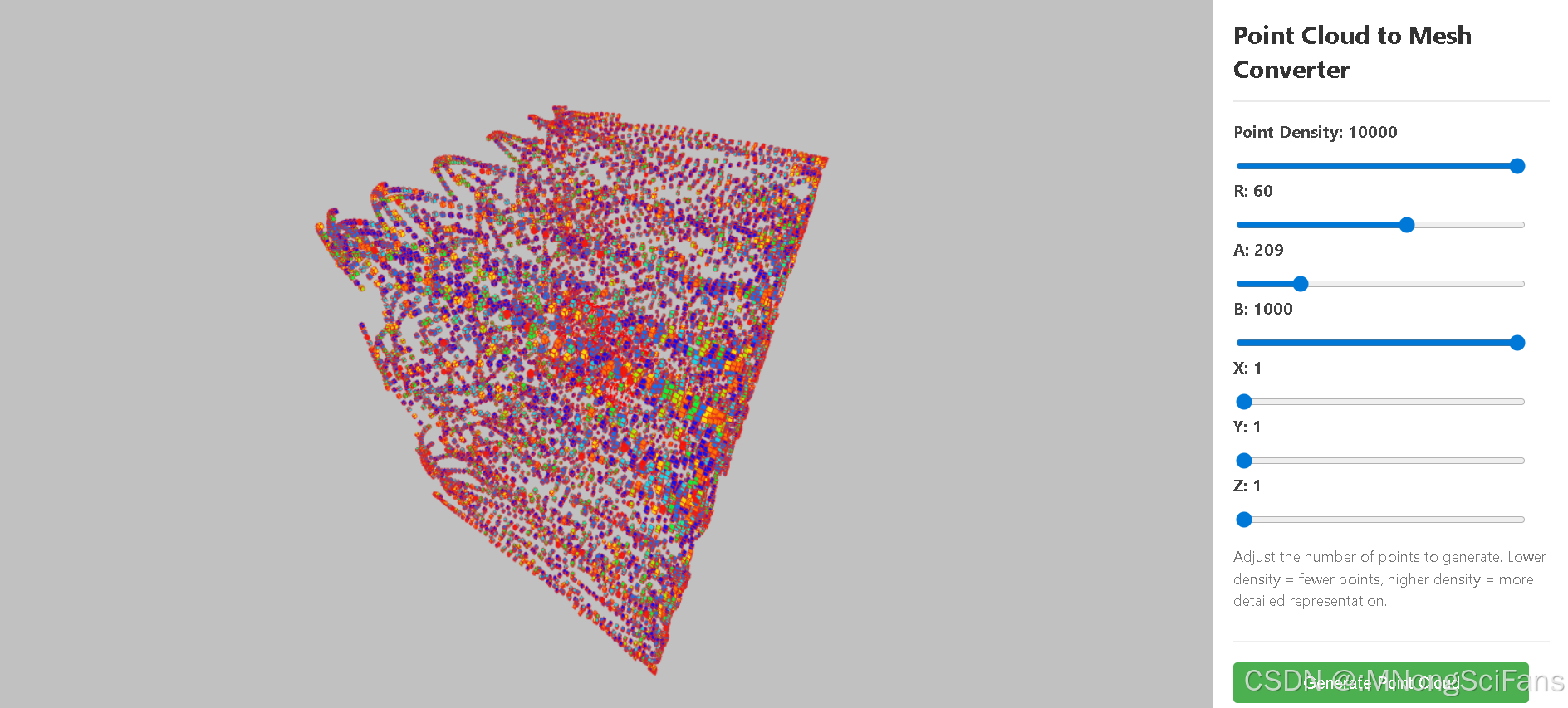
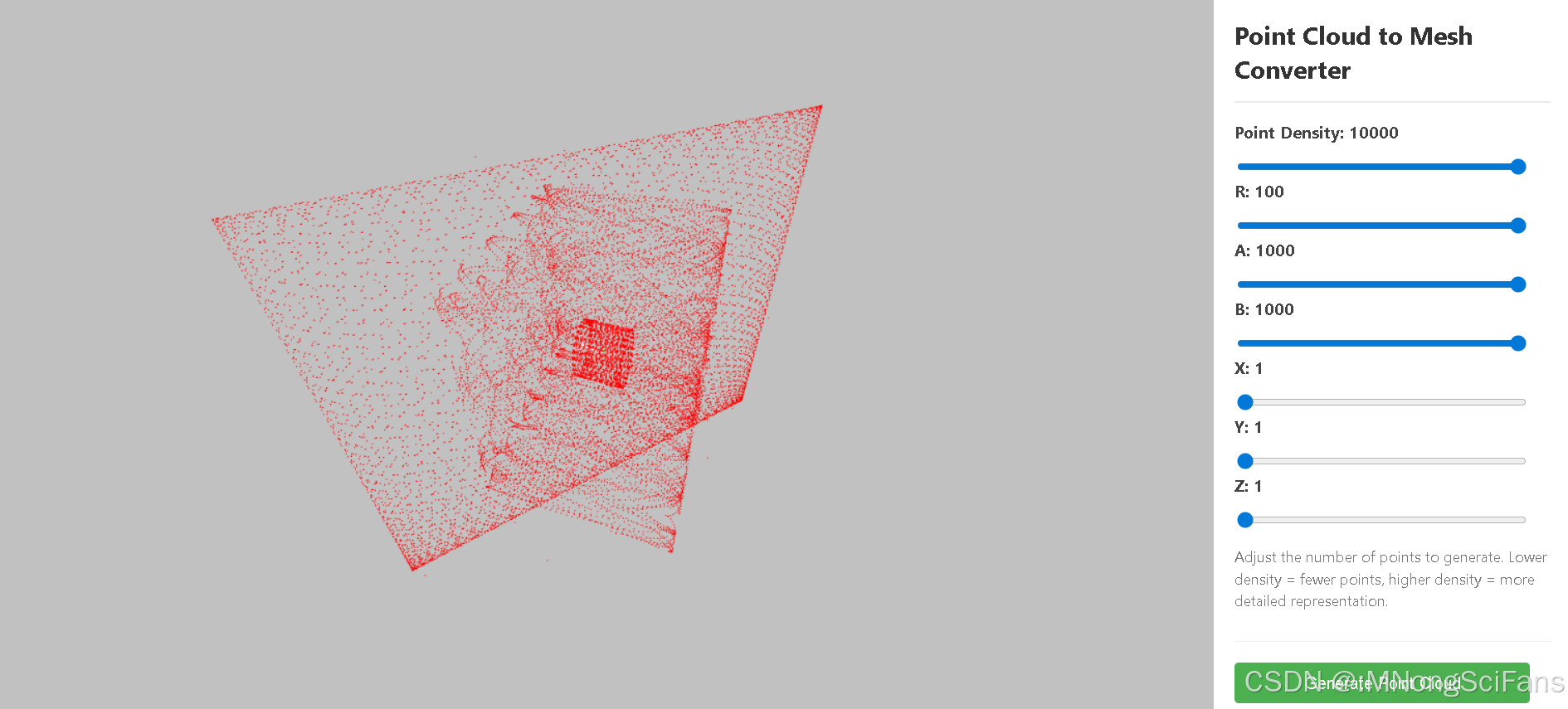
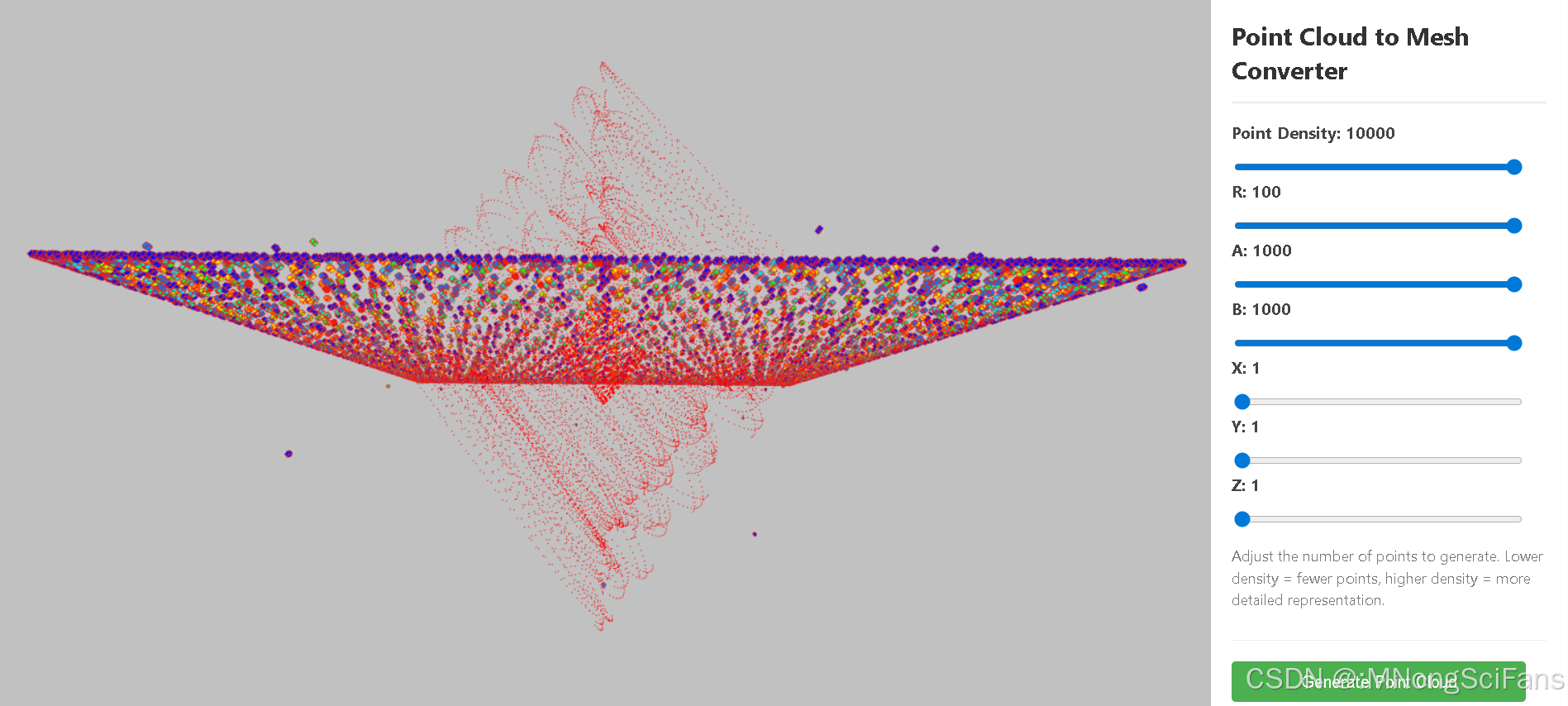
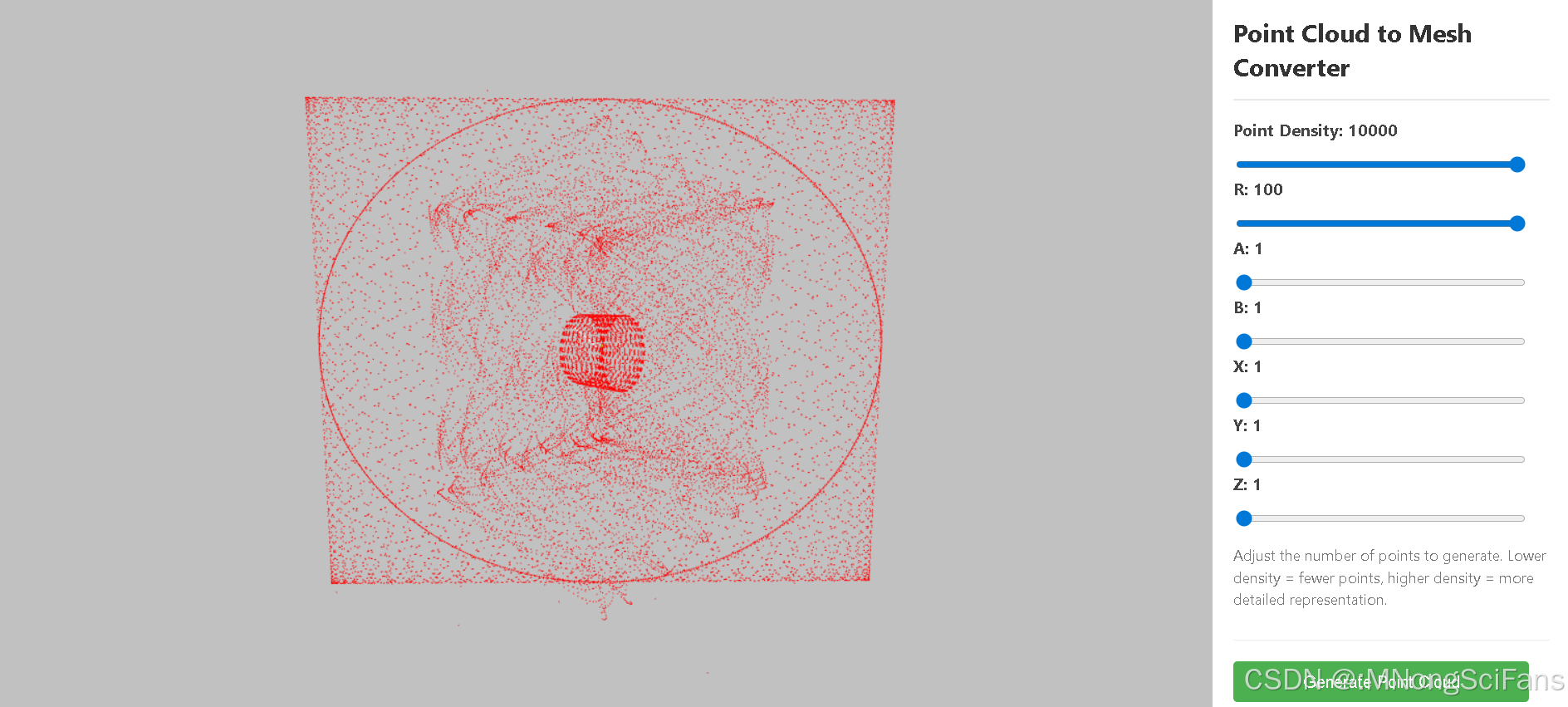
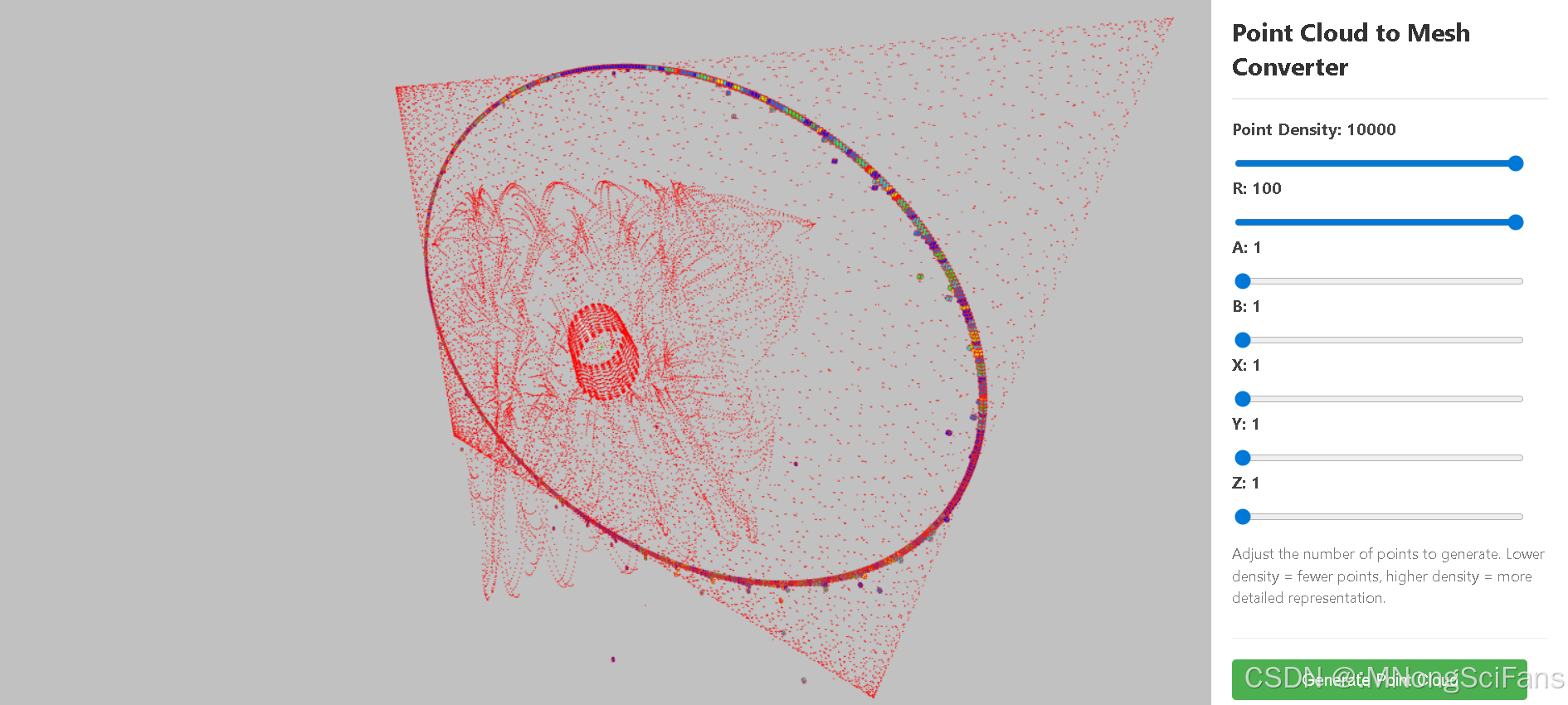
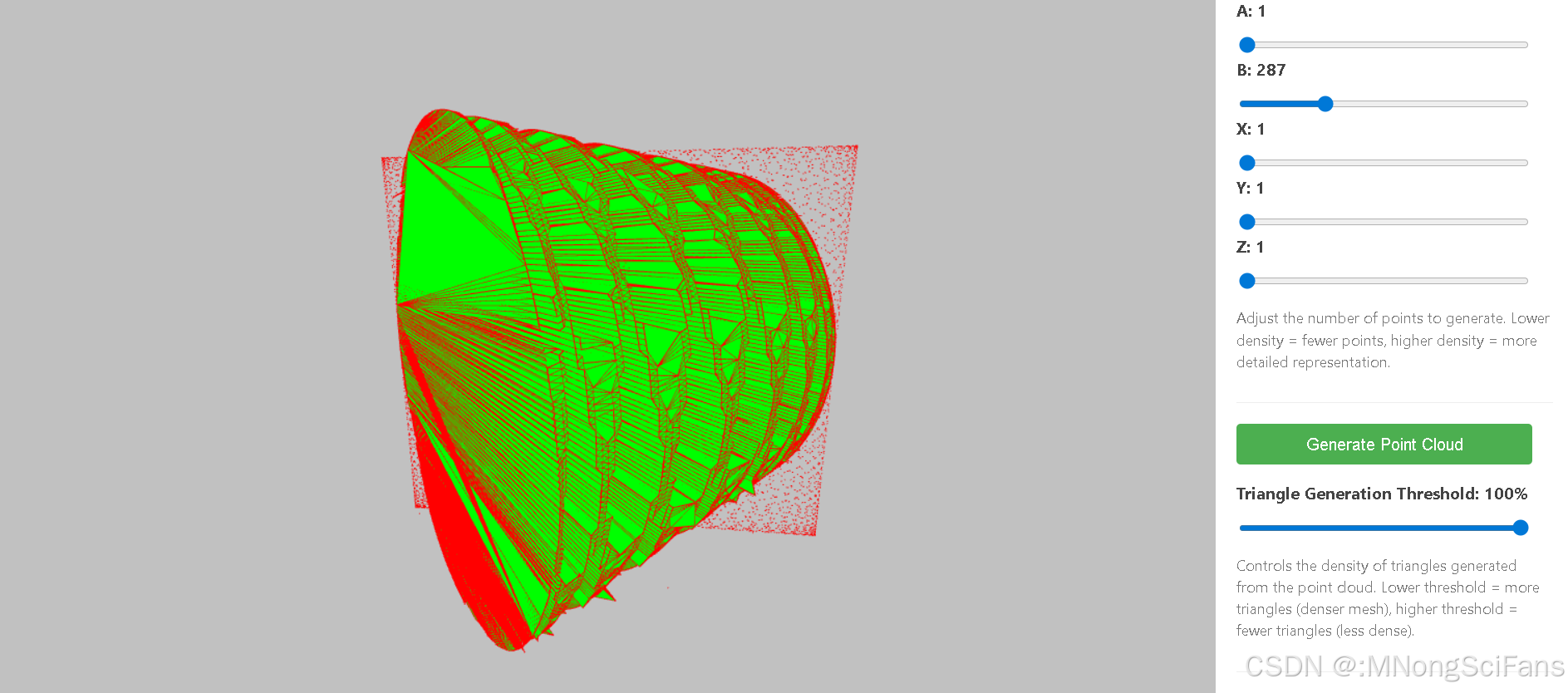
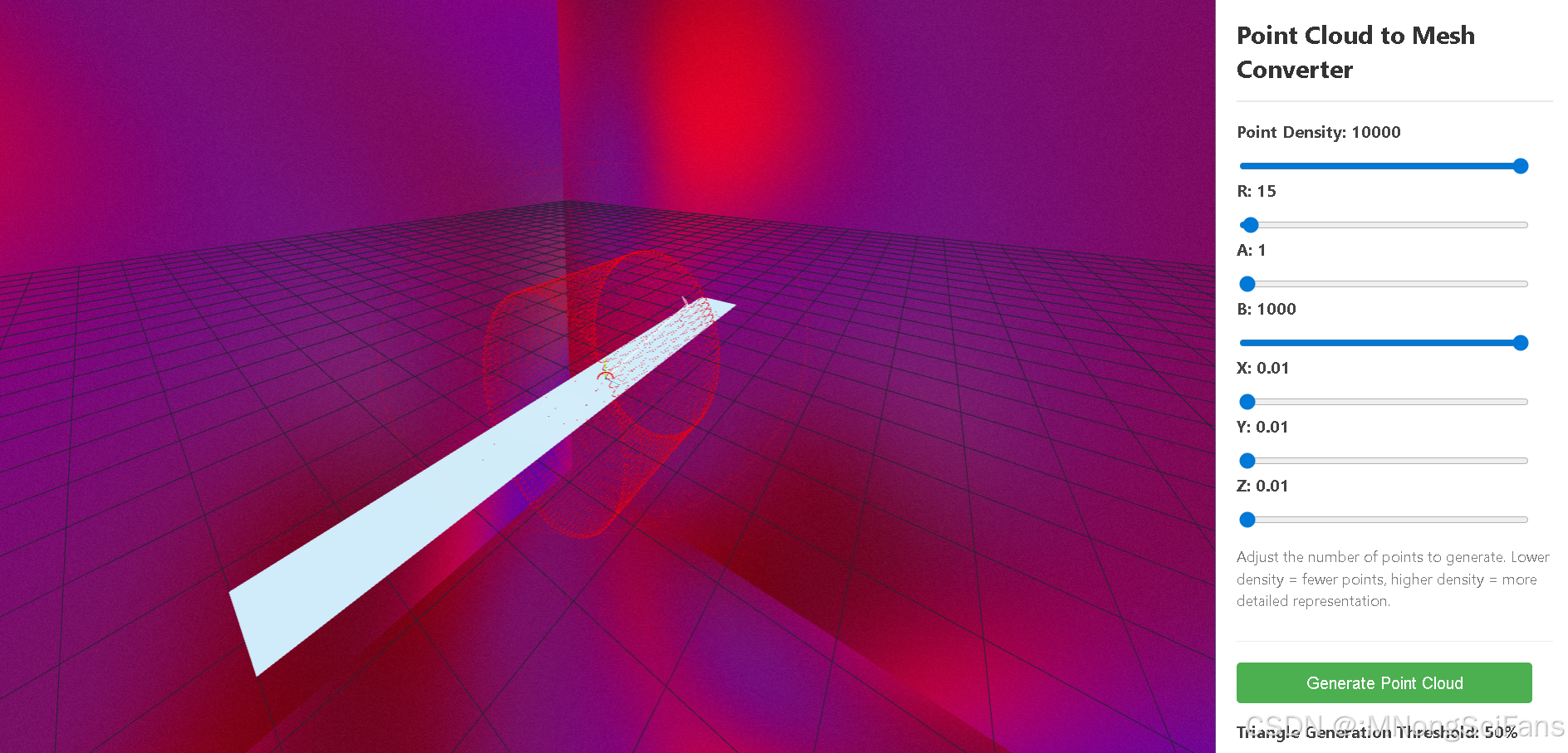
在线演示demo:3D Point Cloud to Mesh
<!DOCTYPE html>
<html lang="en">
<head>
<meta charset="UTF-8">
<meta name="viewport" content="width=device-width, initial-scale=1.0">
<title>3D Point Cloud to Mesh</title>
<style>
body {
margin: 0;
padding: 0;
overflow: hidden;
background-color: #f0f0f0;
font-family: 'Segoe UI', Tahoma, Geneva, Verdana, sans-serif;
}
.container {
display: flex;
height: 100vh;
}
#canvas-container {
flex-grow: 1;
position: relative;
}
.controls-panel {
width: 320px;
background-color: white;
padding: 20px;
box-shadow: -2px 0 10px rgba(0,0,0,0.1);
overflow: auto;
}
h1 {
color: #333;
font-size: 24px;
margin-top: 0;
border-bottom: 2px solid #eaeaea;
padding-bottom: 15px;
}
.control-group {
margin-bottom: 20px;
padding-bottom: 15px;
border-bottom: 1px solid #eee;
}
label {
display: block;
margin-bottom: 8px;
font-weight: bold;
color: #444;
}
input[type="range"] {
width: calc(100% - 25px);
height: 6px;
border-radius: 3px;
background: #d3d3d3;
outline: none;
margin-bottom: 8px;
}
.control-description {
font-size: 14px;
color: #777;
line-height: 1.5;
}
button {
background-color: #4CAF50;
border: none;
color: white;
padding: 10px 15px;
text-align: center;
font-size: 16px;
margin-bottom: 15px;
cursor: pointer;
border-radius: 4px;
width: calc(100% - 20px);
}
button:hover {
background-color: #45a049;
}
</style>
</head>
<body>
<div class="container">
<div id="canvas-container"></div>
<div class="controls-panel">
<h1>Point Cloud to Mesh Converter</h1>
<div class="control-group">
<label for="point-count">Point Density: <span id="count">1</span></label>
<input onchange="changeFunCount(this)" type="range" id="point-count" min="1" max="10000" value="1">
<label for="point-R">R: <span id="R">1</span></label>
<input onchange="changeFunR(this)" step="1" type="range" id="point-R" min="1" max="100" value="1">
<label for="point-A">A: <span id="A">1</span></label>
<input onchange="changeFunA(this)" step="1" type="range" id="point-A" min="1" max="1000" value="1">
<label for="point-B">B: <span id="B">1</span></label>
<input onchange="changeFunB(this)" step="1" type="range" id="point-B" min="1" max="1000" value="1">
<label for="point-X">X: <span id="X">1</span></label>
<input onchange="changeFunX(this)" step="1" type="range" id="point-B" min="1" max="100" value="1">
<label for="point-Y">Y: <span id="Y">1</span></label>
<input onchange="changeFunY(this)" step="1" type="range" id="point-B" min="1" max="100" value="1">
<label for="point-Z">Z: <span id="Z">1</span></label>
<input onchange="changeFunZ(this)" step="1" type="range" id="point-B" min="1" max="100" value="1">
<p class="control-description">Adjust the number of points to generate. Lower density = fewer points, higher density = more detailed representation.</p>
</div>
<button id="generate-button">Generate Point Cloud</button>
<div class="control-group">
<label for="triangles-threshold">Triangle Generation Threshold: <span id="threshold">50</span>%</label>
<input onchange="changeFunThre(this)" type="range" id="triangles-threshold" min="1" max="100" value="50">
<p class="control-description">Controls the density of triangles generated from the point cloud. Lower threshold = more triangles (denser mesh), higher threshold = fewer triangles (less dense).</p>
</div>
<button id="create-mesh-button">Create 3D Mesh</button>
</div>
</div>
<!-- 引入Three.js库 -->
<script src="https://cdn.jsdelivr.net/npm/three@0.142.0/build/three.min.js"></script>
<script src="https://cdn.jsdelivr.net/npm/three@0.142.0/examples/js/controls/OrbitControls.min.js"></script>
<script src="https://cdn.jsdelivr.net/npm/d3-delaunay@6.0.4/dist/d3-delaunay.min.js"></script>
<script src="https://d3js.org/d3.v7.min.js"></script>
<!-- 引入Delaunay算法用于三角剖分 -->
<script>
// Enhanced Delaunay library loading with simplified fallback logic
function verifyDelaunayLoaded() {
return new Promise((resolve, reject) => {
const loadAttempts = [
{
name: 'Primary CDN',
url: 'https://cdn.jsdelivr.net/npm/delaunator@5.0.1/delaunator.min.js',
globalVar: 'Delaunator'
},
{
name: 'Alternative CDN',
url: 'https://unpkg.com/delaunator@5.0.1/delaunator.min.js',
globalVar: 'Delaunator'
},
{
name: 'Local Fallback',
url: './assets/js/delaunator.min.js',
globalVar: 'Delaunator'
}
];
function attemptLoad(index) {
if (index >= loadAttempts.length) {
reject(new Error('All Delaunay loading attempts failed'));
return;
}
const attempt = loadAttempts[index];
console.log(`Attempting ${attempt.name} (${attempt.url})...`);
const script = document.createElement('script');
script.src = attempt.url;
script.onload = () => {
if (window[attempt.globalVar]) {
window.Delaunay = window[attempt.globalVar];
console.log(`${attempt.name} loaded successfully`);
resolve();
} else {
console.warn(`${attempt.name} loaded but ${attempt.globalVar} not defined`);
attemptLoad(index + 1);
}
};
script.onerror = () => {
console.warn(`Failed to load ${attempt.name}`);
attemptLoad(index + 1);
};
document.head.appendChild(script);
}
attemptLoad(0);
});
}
//Initializes the Delaunay library and handles any potential errors.
/*
verifyDelaunayLoaded()
.then(() => console.log('Delaunay initialization complete'))
.catch(err => {
console.error('Critical error:', err.message);
const errorMessage = `3D Mesh Generation Limited:\nFailed to load Delaunay triangulation library.\n\n${err.message}\n\nSome features may not be available.`;
// Create error notification element
const errorEl = document.createElement('div');
errorEl.style.position = 'fixed';
errorEl.style.bottom = '20px';
errorEl.style.left = '20px';
errorEl.style.padding = '15px';
errorEl.style.backgroundColor = '#ffebee';
errorEl.style.borderLeft = '4px solid #f44336';
errorEl.style.maxWidth = '300px';
errorEl.innerHTML = `<strong>Library Error</strong><p>${errorMessage.replace(/\n/g, '<br>')}</p>`;
document.body.appendChild(errorEl);
// Disable mesh generation button with better UX
const meshButton = document.getElementById('create-mesh-button');
meshButton.disabled = true;
meshButton.style.backgroundColor = '#ff9800';
meshButton.textContent = 'Mesh Limited (See Error)';
meshButton.title = errorMessage;
});
*/
</script>
<script>
// 主要变量
let scene, camera, renderer;
let pointCloud = null;
let meshModel = null;
const container3D = document.getElementById('canvas-container');
const cubes = new THREE.Group()
// 初始化场景、相机和渲染器
function init() {
// 创建场景
scene = new THREE.Scene();
scene.background = new THREE.Color(0xc1c1c1);
// 创建透视相机,位置为Z轴方向以便从正面查看对象
camera = new THREE.PerspectiveCamera(
75,
window.innerWidth / (window.innerHeight - 10),
0.1,
1000
);
camera.position.z = 8;
// 创建WebGL渲染器,并设置其大小为容器宽度,高度为减去控制面板的高度(假设60px)
renderer = new THREE.WebGLRenderer({ antialias:true,//设置渲染器锯齿属性
alpha: true, // canvas是否包含alpha (透明度) 默认为 false
precision: 'highp',});
renderer.setSize(container3D.clientWidth, window.innerHeight - 10);
container3D.appendChild(renderer.domElement);
// Initialize OrbitControls - moved after renderer creation
const controls = new THREE.OrbitControls(camera, renderer.domElement);
controls.enableDamping = true; // an animation loop is required when damping is enabled
controls.dampingFactor = 0.25;
controls.screenSpacePanning = false;
controls.maxPolarAngle = Math.PI; // restrict vertical rotation
// 添加光源
const ambientLight = new THREE.AmbientLight(0xffffff, 1);
scene.add(ambientLight);
const directionalLight = new THREE.DirectionalLight(0xffffff, 0.8);
directionalLight.position.set(10, 10, 10);
directionalLight.castShadow = true
directionalLight.shadow.mapSize.width = 1024
directionalLight.shadow.mapSize.height = 1024
// 方向光投影近点、远点更新
directionalLight.shadow.camera.near = 1
directionalLight.shadow.camera.far = 100
// 方向光投影边界更新
directionalLight.shadow.camera.top = 8
directionalLight.shadow.camera.bottom = -8
directionalLight.shadow.camera.left = -8
directionalLight.shadow.camera.right = 8
scene.add(directionalLight);
// 创建辅助工具
const lightHelper = new THREE.DirectionalLightHelper(directionalLight)
scene.add(lightHelper)
// 添加坐标轴辅助线
const axesHelper = new THREE.AxesHelper(3);
scene.add(axesHelper);
// 设置初始点云数据(可以是随机生成或从外部导入)
createPointCloud();
// 响应窗口大小变化
window.addEventListener('resize', onWindowResize, false);
scene.add(cubes);
}
function removeFunCubes(){
// 递归遍历组对象group释放所有后代网格模型绑定几何体占用内存
cubes.traverse(function(obj) {
if (obj.type === 'Mesh') {
obj.geometry.dispose();
obj.material.dispose();
obj.visible = false;
setTimeout(()=>{
scene.remove(scene.getObjectByName(obj.name));
},1)
}
})
// 删除场景对象scene的子对象group
//scene.remove(scene.getObjectByName("pcloud"));
}
// 创建点云对象
function createPointCloud(points = generateRandomPoints()) {
// Validate points array
if (!points || !points.length) {
console.warn('No points provided, using default points');
points = generateRandomPoints();
}
if(cubes.children.length){
removeFunCubes()
}
for (let i = 0; i < points.length; i++) {
if (isNaN(points[i].x) || isNaN(points[i].y) || isNaN(points[i].z)) {
console.error('Invalid point at index', i, ':', points[i]);
points[i] = { x: 0, y: 0, z: 0 }; // Replace NaN with zero
}
}
const geometry = new THREE.BufferGeometry();
const positions = new Float32Array(points.length * 3);
for (let i = 0; i < points.length; i++) {
positions[i * 3] = points[i].x;
positions[i * 3 + 1] = points[i].y;
positions[i * 3 + 2] = points[i].z;
setTimeout(()=>{
addBoxDiscrete(points[i].x,points[i].y,points[i].z)
},1)
}
geometry.setAttribute('position', new THREE.BufferAttribute(positions, 3));
geometry.computeBoundingSphere();
const material = new THREE.PointsMaterial({ color: 0xff0000, size: 0.1 });
pointCloud = new THREE.Points(geometry, material); // Assign to global variable
pointCloud.name="pcloud"
scene.add(pointCloud); // Add to scene
return pointCloud;
}
function randomRGBColor() {
var r = Math.floor(Math.random() * 256);
var g = Math.floor(Math.random() * 256);
var b = Math.floor(Math.random() * 256);
return 'rgb(' + r + ',' + g + ',' + b + ')';
}
function randomHexColor() {
return '#' + Math.floor(Math.random() * 16777215).toString(16);
}
function randomHexColor1() {
return '0x' + Math.floor(Math.random() * 16777215).toString(16);
}
function randomRGBAColor() {
var r = Math.floor(Math.random() * 256);
var g = Math.floor(Math.random() * 256);
var b = Math.floor(Math.random() * 256);
var a = Math.random().toFixed(1);
return 'rgba(' + r + ',' + g + ',' + b + ',' + a + ')';
}
function hexToRgb(hex) {
var result = /^#?([a-f\d]{2})([a-f\d]{2})([a-f\d]{2})$/i.exec(hex);
return result ? {
r: parseInt(result[1], 16),
g: parseInt(result[2], 16),
b: parseInt(result[3], 16)
} : null;
}
function isValidBufferGeometry(geometry) {
if (!(geometry instanceof THREE.BufferGeometry)) {
return false;
}
const position = geometry.attributes.position;
if (!position) {
return false;
}
// 检查顶点数组的长度是否合理
if (position.count < 3) {
return false;
}
// 检查顶点数组是否包含正确的数据类型
if (position.array.constructor !== Float32Array) {
return false;
}
// 可以继续检查其他属性,如法线、UV等
return true;
}
const colorsPalette = [
{color:'#ff0f00', name:'11'},
{color:'#ff7d00', name:'10'},
{color:'#ffec00', name:'9'},
{color:'#a3ff00', name:'8'},
{color:'#00ff39', name:'7'},
{color:'#00ffa8', name:'6'},
{color:'#00e7ff', name:'5'},
{color:'#0078ff', name:'3'},
{color:'#000aff', name:'1'},
]
const colorsPalette1 = {
1:'#ff0f00',
2:'#ff7d00',
3:'#ffec00',
4:'#a3ff00',
5:'#00ff39',
6:'#00ffa8',
7:'#00e7ff',
8:'#0078ff',
9:'#000aff',
}
function randomNumArr(n=0, m =0){
let num = Math.floor(Math.random() * (m - n + 1)) + n
return num
}
function addColorBuffer(geometry){
// 使用函数检查几何体
const isValid = isValidBufferGeometry(geometry);
if(!isValid){
return
}
const pos = geometry.attributes.position;
const count = pos.count; //顶点数量
// 1. 计算模型y坐标高度差
const xArr = [];//顶点所有x坐标,也就是地形高度
const yArr = [];//顶点所有y坐标,也就是地形高度
const zArr = [];//顶点所有z坐标,也就是地形高度
for (let i = 0; i < count; i++) {
xArr.push(pos.getX(i));//获取顶点x坐标,也就是地形高度
yArr.push(pos.getY(i));//获取顶点y坐标,也就是地形高度
zArr.push(pos.getZ(i));//获取顶点z坐标,也就是地形高度
}
if (xArr.some(isNaN)) throw new Error("Invalid vertex xdata");
if (yArr.some(isNaN)) throw new Error("Invalid vertex ydata");
if (zArr.some(isNaN)) throw new Error("Invalid vertex zdata");
xArr.sort();//数组元素排序,从小到大
const minx = xArr[0];//x最小值
const maxx = xArr[xArr.length - 1];//x最大值
const xheight = maxx - minx; //山脉整体高度
yArr.sort();//数组元素排序,从小到大
const miny = yArr[0];//y最小值
const maxy = yArr[yArr.length - 1];//y最大值
const yheight = maxy - miny; //山脉整体高度
zArr.sort();//数组元素排序,从小到大
const minz = zArr[0];//z最小值
const maxz = zArr[zArr.length - 1];//z最大值
const zheight = maxz - minz; //山脉整体高度
//console.log("x:",minx,maxx,xheight);
//console.log("y:",miny,maxy,yheight);
//console.log("z:",minz,maxz,zheight);
// 计算每个顶点的颜色值 // 2. 计算每个顶点的颜色值
const colorsArr = [];
// 根据顶点距离起点远近进行颜色插值计算
let c1 = new THREE.Color(parseInt(colorsPalette[8].color)); //曲线起点颜色 蓝色 山谷颜色
let c2 = new THREE.Color(parseInt(colorsPalette[0].color)); //曲线结束点颜色 红色 山顶颜色
for (let i = 0; i < count; i++) {
//const percent = i / count; //点索引值相对所有点数量的百分比
// 红色分量从0到1变化,蓝色分量从1到0变化
//colorsArr.push(percent, 0, 1 - percent); //蓝色到红色渐变色
//根据顶点位置顺序大小设置颜色渐变
//const c = c1.clone().lerp(c2, percent);//颜色插值计算
//const c = new THREE.Color();
//颜色插值结果,和c1一样rgb(1,0,0),50% c1 + 50% c2混合
//c.lerpColors(c1,c2, 0.5);
//colorsArr.push(c.r, c.g, c.b);
//梯度(gradient)、散度(divergence)与旋度(rotation)
//梯度:标量求梯度得到矢量。
//散度:矢量求散度得到标量。
//旋度:矢量求旋度得到矢量。
//当前高度和整体高度比值
//const percent = (pos.getX(i) - minx) / xheight;
//const c = c1.clone().lerp(c2, percent);//颜色插值计算
//colorsArr.push(c.r, c.g, c.b);
//ymax: 2845
//ymin: 1750
if(pos.getY(i)>=10 && pos.getY(i)<20 ){
c1 = new THREE.Color(parseInt(colorsPalette[8].color)); //曲线起点颜色 蓝色 山谷颜色
c2 = new THREE.Color(parseInt(colorsPalette[8].color)); //曲线结束点颜色 红色 山顶颜色
} else if(pos.getY(i)>=20 && pos.getY(i)<30 ){
c1 = new THREE.Color(parseInt(colorsPalette[7].color)); //曲线起点颜色 蓝色 山谷颜色
c2 = new THREE.Color(parseInt(colorsPalette[7].color)); //曲线结束点颜色 红色 山顶颜色
} else if(pos.getY(i)>=30 && pos.getY(i)<40 ){
c1 = new THREE.Color(parseInt(colorsPalette[6].color)); //曲线起点颜色 蓝色 山谷颜色
c2 = new THREE.Color(parseInt(colorsPalette[6].color)); //曲线结束点颜色 红色 山顶颜色
} else if(pos.getY(i)>=40 && pos.getY(i)<50 ){
c1 = new THREE.Color(parseInt(colorsPalette[5].color)); //曲线起点颜色 蓝色 山谷颜色
c2 = new THREE.Color(parseInt(colorsPalette[5].color)); //曲线结束点颜色 红色 山顶颜色
} else if(pos.getY(i)>=50 && pos.getY(i)<60 ){
c1 = new THREE.Color(parseInt(colorsPalette[4].color)); //曲线起点颜色 蓝色 山谷颜色
c2 = new THREE.Color(parseInt(colorsPalette[4].color)); //曲线结束点颜色 红色 山顶颜色
} else if(pos.getY(i)>=60 && pos.getY(i)<70 ){
c1 = new THREE.Color(parseInt(colorsPalette[3].color)); //曲线起点颜色 蓝色 山谷颜色
c2 = new THREE.Color(parseInt(colorsPalette[3].color)); //曲线结束点颜色 红色 山顶颜色
} else if(pos.getY(i)>=70 && pos.getY(i)<80 ){
c1 = new THREE.Color(parseInt(colorsPalette[2].color)); //曲线起点颜色 蓝色 山谷颜色
c2 = new THREE.Color(parseInt(colorsPalette[1].color)); //曲线结束点颜色 红色 山顶颜色
} else if(pos.getY(i)>=80 && pos.getY(i)<90 ){
c1 = new THREE.Color(parseInt(colorsPalette[1].color)); //曲线起点颜色 蓝色 山谷颜色
c2 = new THREE.Color(parseInt(colorsPalette[0].color)); //曲线结束点颜色 红色 山顶颜色
}
//console.log(pos.getY(i))
const percent = (pos.getY(i) - miny) / yheight;
const c = c1.clone().lerp(c2, percent);//颜色插值计算
colorsArr.push(c.r, c.g, c.b);
//const percent = (pos.getZ(i) - minz) / zheight;
//const c = c1.clone().lerp(c2, percent);//颜色插值计算
//colorsArr.push(c.r, c.g, c.b);
}
const colorBuffer = new Float32Array(colorsArr);
return colorBuffer
}
function addColorBuffer1(geometry,n=0,a=1,b=1,len=10,r=3){
// 使用函数检查几何体
const isValid = isValidBufferGeometry(geometry);
if(!isValid){
return
}
const pos = geometry.attributes.position;
const count = pos.count; //顶点数量
// 1. 计算模型y坐标高度差
const xArr = [];//顶点所有x坐标,也就是地形高度
const yArr = [];//顶点所有y坐标,也就是地形高度
const zArr = [];//顶点所有z坐标,也就是地形高度
for (let i = 0; i < count; i++) {
xArr.push(pos.getX(i));//获取顶点x坐标,也就是地形高度
yArr.push(pos.getY(i));//获取顶点y坐标,也就是地形高度
zArr.push(pos.getZ(i));//获取顶点z坐标,也就是地形高度
}
xArr.sort();//数组元素排序,从小到大
const minx = xArr[0];//x最小值
const maxx = xArr[xArr.length - 1];//x最大值
const xheight = maxx - minx; //山脉整体高度
yArr.sort();//数组元素排序,从小到大
const miny = yArr[0];//y最小值
const maxy = yArr[yArr.length - 1];//y最大值
const yheight = maxy - miny; //山脉整体高度
zArr.sort();//数组元素排序,从小到大
const minz = zArr[0];//z最小值
const maxz = zArr[zArr.length - 1];//z最大值
const zheight = maxz - minz; //山脉整体高度
//console.log("x:",minx,maxx,xheight);
//console.log("y:",miny,maxy,yheight);
//console.log("z:",minz,maxz,zheight);
// 计算每个顶点的颜色值 // 2. 计算每个顶点的颜色值
const colorsArr = [];
// 根据顶点距离起点远近进行颜色插值计算
let c1 = new THREE.Color(parseInt(colorsPalette[8].color)); //曲线起点颜色 蓝色 山谷颜色
let c2 = new THREE.Color(parseInt(colorsPalette[0].color)); //曲线结束点颜色 红色 山顶颜色
let xNum = [];
let yNum = [];
let zNum = [];
//const len = 1000;
//let r = 3000;
//let a = 6;
//let b = 5;
for (let ix=1; ix < len; ix++) {
let theta = Math.PI / ix; // 度角对应的弧度
let x1 = r * Math.cos(a*ix + theta);
//let y1 = r * Math.tan(theta)*Math.cos(theta); // 计算y坐标
//let y1 = r * Math.cos(b*ix); // 计算y坐标
let y1 = r * Math.sin(a*b*ix + theta);
let z1 = r * Math.cos(b*ix)
/*
xNum.push(Number(randomNumArr(minx+x1, maxx-y1).toFixed(0)/100));
yNum.push(Number(randomNumArr(miny+y1, maxy-y1).toFixed(0)/100));
zNum.push(Number(randomNumArr(minz+z1, maxz-z1).toFixed(0)/100));
*/
xNum.push(Number(randomNumArr(x1, x1).toFixed(0)/1))
yNum.push(Number(randomNumArr(y1, y1).toFixed(0)/1))
zNum.push(Number(randomNumArr(z1, z1).toFixed(0)/1))
}
//console.log(xNum,yNum,zNum)
//xNum = Array.from({length: maxx-minx}, (i, j) => j+minx)
//yNum = Array.from({length: maxy-miny}, (i, j) => j+miny)
//zNum = Array.from({length: maxz-minz}, (i, j) => j+minz)
//const START=2, END=5;
//Array.from({length: END-START}, (x, i) => i+START)
//yNum = Array.from({length: maxy-miny}, (x, j) => j+miny)
//console.log(xNum,yNum,zNum)
let num = n //randomNumArr(0, 8)
//console.log(num)
for (let i = 0; i < count; i++) {
//const percent = i / count; //点索引值相对所有点数量的百分比
// 红色分量从0到1变化,蓝色分量从1到0变化
//colorsArr.push(percent, 0, 1 - percent); //蓝色到红色渐变色
//根据顶点位置顺序大小设置颜色渐变
//const c = c1.clone().lerp(c2, percent);//颜色插值计算
//const c = new THREE.Color();
//颜色插值结果,和c1一样rgb(1,0,0),50% c1 + 50% c2混合
//c.lerpColors(c1,c2, 0.5);
//colorsArr.push(c.r, c.g, c.b);
//梯度(gradient)、散度(divergence)与旋度(rotation)
//梯度:标量求梯度得到矢量。
//散度:矢量求散度得到标量。
//旋度:矢量求旋度得到矢量。
//当前高度和整体高度比值
//const percent = (pos.getX(i) - minx) / xheight;
//const c = c1.clone().lerp(c2, percent);//颜色插值计算
//colorsArr.push(c.r, c.g, c.b);
//ymax: 2845
//ymin: 1750
//for(let y = miny; y < maxy; y+=(maxy/1000)){
if(xNum.includes((pos.getX(i)).toFixed(0)/1)
|| yNum.includes((pos.getY(i)).toFixed(0)/1)
|| zNum.includes((pos.getZ(i)).toFixed(0)/1)){
c1 = new THREE.Color(parseInt(colorsPalette[num].color)); //曲线起点颜色 蓝色 山谷颜色
c2 = new THREE.Color(parseInt(colorsPalette[num].color)); //曲线结束点颜色 红色 山顶颜色
}else{
c1 = new THREE.Color(parseInt("0xc0c0c0")); //曲线起点颜色 蓝色 山谷颜色
c2 = new THREE.Color(parseInt("0xc0c0c0")); //曲线结束点颜色 红色 山顶颜色
}
//}
//console.log(pos.getY(i))
const percent = (pos.getY(i) - miny) / yheight;
const c = c1.clone().lerp(c2, percent);//颜色插值计算
colorsArr.push(c.r, c.g, c.b);
//const percent = (pos.getZ(i) - minz) / zheight;
//const c = c1.clone().lerp(c2, percent);//颜色插值计算
//colorsArr.push(c.r, c.g, c.b);
}
const colorBuffer = new Float32Array(colorsArr);
return colorBuffer
}
// 创建3D模型网格(从点云生成)
function createMeshModel() {
if (meshModel) scene.remove(meshModel);
const verticesArray = [];
const colorsArray = [];
// 1. 将场景中的点云转换为顶点数组
const positions = pointCloud.geometry.attributes.position.array;
for (let i = 0; i < positions.length; i += 3) {
verticesArray.push(positions[i], positions[i+1], positions[i+2]);
}
// First check if Delaunay is available
if (typeof Delaunay === 'undefined') {
console.error('Delaunay library not loaded');
alert('Delaunay triangulation library not loaded - cannot create mesh');
return;
}
// Create the geometry object before using it
const geometry = new THREE.BufferGeometry();
geometry.setAttribute('position', new THREE.BufferAttribute(new Float32Array(verticesArray), 3));
//选择不同的曲面重建算法和参数,根据点云数据生成模型
//点云数据是通过三维扫描设备对物体表面进行采样得到的离散点集合,
//它记录了物体表面的几何信息,但缺乏明确的拓扑结构和表面连接关系。
//基于 Delaunay 三角化的方法是一种广泛应用且有效的点云曲面重建技术,
//其核心思想是通过构建合适的三角剖分来近似表示物体的表面。
// Use delaunay-ts library for triangulation
const width = 6;
const height = 2;
// Generating a set of random points
const points = Array
.from({length: 100},() => [Math.random() * width, Math.random() * height]);
const delaunay = Delaunay.from(verticesArray);
let vert = []
for (let i = 0; i < verticesArray.length; i += 3) {
vert.push([verticesArray[i], verticesArray[i+1], verticesArray[i+2]]);
}
const voronoi = d3.Delaunay.from(vert);
//const hull = voronoi.hullPolygon();
//for (const point of hull) {
//console.log(point[0], point[1]);
//}
//const segments = voronoi.render().split(/M/).slice(1);
//for (const e of segments) {
//console.log(e);
//}
const triangles = voronoi.triangles || delaunay.triangles //positions || delaunay.triangles;
// 将三角形转换为索引数据并创建几何体
let indices = [];
for (let i = 0; i < triangles.length; i += 3) {
indices.push(triangles[i], triangles[i+1], triangles[i+2]);
}
//for (let i = 0; i < hull.length; i++) {
//console.log(hull[i])
//indices.push(hull[i][0], hull[i][1], hull[i][0]);
//}
//for (let i = 0; i < segments.length-1; i++) {
//let seg = segments[i].split(",")
//indices.push(Number(seg[0]), Number(seg[1]), Number(seg[2]));
//}
//console.log(delaunay,triangles,indices);
geometry.setIndex([
0, 1, 2, 2, 1, 3, // front
4, 5, 6, 6, 5, 7, // right
8, 9, 10, 10, 9, 11, // back
12, 13, 14, 14, 13, 15, // left
16, 17, 18, 18, 17, 19, // top
20, 21, 22, 22, 21, 23, // bottom
]);
geometry.setIndex(indices)
// 创建材质(如果没有颜色属性,则使用默认颜色)
const material = new THREE.MeshPhongMaterial({
vertexColors: true,
flatShading: 0, // 使用平滑着色
shininess: 80,
side: THREE.DoubleSide
});
let materialLambert = new THREE.MeshLambertMaterial({
color: 0xffff00,
emissive: 0xff0000
})
let materialPhong = new THREE.MeshPhongMaterial({
color: 0xff0000,
specular: 0xffff00,
shininess: 100
});
let geo = new THREE.BoxGeometry(3,2,3)
let mat = new THREE.MeshBasicMaterial({ color: 0x00ff00 })
let colorBuffer = addColorBuffer(geo)
let color = new THREE.BufferAttribute(colorBuffer, 3);
geometry.attributes.color = color;
meshModel = new THREE.Mesh(geometry, mat);
meshModel.position.set(0, 0, 0);
// 创建网格线(用于显示面)
const edgesGeometry = new THREE.WireframeGeometry(geometry);
const lineMaterial = new THREE.LineBasicMaterial({ color: 0xff0000, linewidth: 10 });
const wireframe = new THREE.LineSegments(edgesGeometry, lineMaterial);
wireframe.computeLineDistances();
meshModel.add(wireframe);
scene.add(meshModel);
var lineMaterial1 = new THREE.LineBasicMaterial({ color: 0x0000ff });
let t = 0
let startVector = new THREE.Vector3(
5 * Math.cos(t),
5 * Math.sin(t),
3 * t
);
let endVector = new THREE.Vector3(
5 * Math.cos(t + 10),
5 * Math.sin(t + 10),
3 * t
);
let linePoints = [];
linePoints.push(startVector, endVector);
// Create Tube Geometry
const tubeGeometry = new THREE.TubeGeometry(
new THREE.CatmullRomCurve3(linePoints),
64,// path segments
5,// THICKNESS
5, //Roundness of Tube
false //closed
);
let line = new THREE.Line(tubeGeometry, lineMaterial1);
scene.add(line);
}
// 将点云数据转换为网格的辅助函数(伪代码,需要根据实际算法实现)
function pointCloudToMesh() {
if (!pointCloud) return;
const vertices = [];
const positions = pointCloud.geometry.attributes.position.array;
for (let i = 0; i < positions.length / 3 * 3; i++) { // 遍历所有点
const idx = Math.floor(i / 3);
if (!meshModel) {
verticesArray.push(positions[i], positions[i+1], positions[i+2]);
// 添加一些随机偏移以创建更自然的表面(模拟三维形状)
for (let j = 0; j < 4; j++) {
const pointIndex = idx + j * Math.floor(pointCloud.geometry.attributes.position.count / 5);
if (pointIndex >= verticesArray.length) break;
// 使用随机权重进行颜色插值(假设每个点有颜色属性)
const colorAttr = new THREE.Color();
// pointCloud.material.emissive.getHex() === undefined ?
// 如果材质是自发光的,处理方式不同
}
}
}
// 根据实际实现决定:这里简化了,仅说明思路
// 创建网格线(用于显示面)
const edgesGeometry = new THREE.WireframeGeometry(geometry);
const lineMaterial = new THREE.LineBasicMaterial({ color: 0x00ffff, linewidth: 1 });
const wireframe = new THREE.LineSegments(edgesGeometry, lineMaterial);
scene.add(wireframe);
}
function addBoxDiscrete(x1=0,y1=0,z1=0){
const { x, y, z } = parameters
//三个点构成一个三角面,右手法则判断点的顺序和法线方向
let fourFace = {
v1:{
x:0,
y:0,
z:0
},
v2:{
x:0,
y:y,
z:0
},
v3:{
x:x,
y:0,
z:0
},
v4:{
x:0,
y:y,
z:z
},
v5:{
x:0,
y:0,
z:z
},
v6:{
x:x,
y:y,
z:0
},
v7:{
x:x,
y:0,
z:z
},
v8:{
x:x,
y:y,
z:z
}
}
let vertices=[
fourFace.v1.x,fourFace.v1.y,fourFace.v1.z,
fourFace.v2.x,fourFace.v2.y,fourFace.v2.z,
fourFace.v3.x,fourFace.v3.y,fourFace.v3.z,
fourFace.v2.x,fourFace.v2.y,fourFace.v2.z,
fourFace.v1.x,fourFace.v1.y,fourFace.v1.z,
fourFace.v4.x,fourFace.v4.y,fourFace.v4.z,
fourFace.v3.x,fourFace.v3.y,fourFace.v3.z,
fourFace.v5.x,fourFace.v5.y,fourFace.v5.z,
fourFace.v1.x,fourFace.v1.y,fourFace.v1.z,
fourFace.v5.x,fourFace.v5.y,fourFace.v5.z,
fourFace.v4.x,fourFace.v4.y,fourFace.v4.z,
fourFace.v1.x,fourFace.v1.y,fourFace.v1.z,
fourFace.v6.x,fourFace.v6.y,fourFace.v6.z,
fourFace.v3.x,fourFace.v3.y,fourFace.v3.z,
fourFace.v2.x,fourFace.v2.y,fourFace.v2.z,
fourFace.v3.x,fourFace.v3.y,fourFace.v3.z,
fourFace.v6.x,fourFace.v6.y,fourFace.v6.z,
fourFace.v7.x,fourFace.v7.y,fourFace.v7.z,
fourFace.v2.x,fourFace.v2.y,fourFace.v2.z,
fourFace.v4.x,fourFace.v4.y,fourFace.v4.z,
fourFace.v6.x,fourFace.v6.y,fourFace.v6.z,
fourFace.v6.x,fourFace.v6.y,fourFace.v6.z,
fourFace.v4.x,fourFace.v4.y,fourFace.v4.z,
fourFace.v8.x,fourFace.v8.y,fourFace.v8.z,
fourFace.v4.x,fourFace.v4.y,fourFace.v4.z,
fourFace.v5.x,fourFace.v5.y,fourFace.v5.z,
fourFace.v7.x,fourFace.v7.y,fourFace.v7.z,
fourFace.v4.x,fourFace.v4.y,fourFace.v4.z,
fourFace.v7.x,fourFace.v7.y,fourFace.v7.z,
fourFace.v8.x,fourFace.v8.y,fourFace.v8.z,
fourFace.v6.x,fourFace.v6.y,fourFace.v6.z,
fourFace.v8.x,fourFace.v8.y,fourFace.v8.z,
fourFace.v7.x,fourFace.v7.y,fourFace.v7.z,
fourFace.v3.x,fourFace.v3.y,fourFace.v3.z,
fourFace.v7.x,fourFace.v7.y,fourFace.v7.z,
fourFace.v5.x,fourFace.v5.y,fourFace.v5.z,
];
const vertices1 = [
// front
{ pos: [-1, -1, 1], norm: [ 0, 0, 1], uv: [0, 0], },
{ pos: [ 1, -1, 1], norm: [ 0, 0, 1], uv: [1, 0], },
{ pos: [-1, 1, 1], norm: [ 0, 0, 1], uv: [0, 1], },
{ pos: [-1, 1, 1], norm: [ 0, 0, 1], uv: [0, 1], },
{ pos: [ 1, -1, 1], norm: [ 0, 0, 1], uv: [1, 0], },
{ pos: [ 1, 1, 1], norm: [ 0, 0, 1], uv: [1, 1], },
// right
{ pos: [ 1, -1, 1], norm: [ 1, 0, 0], uv: [0, 0], },
{ pos: [ 1, -1, -1], norm: [ 1, 0, 0], uv: [1, 0], },
{ pos: [ 1, 1, 1], norm: [ 1, 0, 0], uv: [0, 1], },
{ pos: [ 1, 1, 1], norm: [ 1, 0, 0], uv: [0, 1], },
{ pos: [ 1, -1, -1], norm: [ 1, 0, 0], uv: [1, 0], },
{ pos: [ 1, 1, -1], norm: [ 1, 0, 0], uv: [1, 1], },
// back
{ pos: [ 1, -1, -1], norm: [ 0, 0, -1], uv: [0, 0], },
{ pos: [-1, -1, -1], norm: [ 0, 0, -1], uv: [1, 0], },
{ pos: [ 1, 1, -1], norm: [ 0, 0, -1], uv: [0, 1], },
{ pos: [ 1, 1, -1], norm: [ 0, 0, -1], uv: [0, 1], },
{ pos: [-1, -1, -1], norm: [ 0, 0, -1], uv: [1, 0], },
{ pos: [-1, 1, -1], norm: [ 0, 0, -1], uv: [1, 1], },
// left
{ pos: [-1, -1, -1], norm: [-1, 0, 0], uv: [0, 0], },
{ pos: [-1, -1, 1], norm: [-1, 0, 0], uv: [1, 0], },
{ pos: [-1, 1, -1], norm: [-1, 0, 0], uv: [0, 1], },
{ pos: [-1, 1, -1], norm: [-1, 0, 0], uv: [0, 1], },
{ pos: [-1, -1, 1], norm: [-1, 0, 0], uv: [1, 0], },
{ pos: [-1, 1, 1], norm: [-1, 0, 0], uv: [1, 1], },
// top
{ pos: [ 1, 1, -1], norm: [ 0, 1, 0], uv: [0, 0], },
{ pos: [-1, 1, -1], norm: [ 0, 1, 0], uv: [1, 0], },
{ pos: [ 1, 1, 1], norm: [ 0, 1, 0], uv: [0, 1], },
{ pos: [ 1, 1, 1], norm: [ 0, 1, 0], uv: [0, 1], },
{ pos: [-1, 1, -1], norm: [ 0, 1, 0], uv: [1, 0], },
{ pos: [-1, 1, 1], norm: [ 0, 1, 0], uv: [1, 1], },
// bottom
{ pos: [ 1, -1, 1], norm: [ 0, -1, 0], uv: [0, 0], },
{ pos: [-1, -1, 1], norm: [ 0, -1, 0], uv: [1, 0], },
{ pos: [ 1, -1, -1], norm: [ 0, -1, 0], uv: [0, 1], },
{ pos: [ 1, -1, -1], norm: [ 0, -1, 0], uv: [0, 1], },
{ pos: [-1, -1, 1], norm: [ 0, -1, 0], uv: [1, 0], },
{ pos: [-1, -1, -1], norm: [ 0, -1, 0], uv: [1, 1], },
];
//将它们全部转换成3个并行数组
const positions = [];
const normals = [];
const uvs = [];
for (const vertex of vertices1) {
positions.push(...vertex.pos);
normals.push(...vertex.norm);
uvs.push(...vertex.uv);
}
const geometry1 = new THREE.BufferGeometry();
const positionNumComponents = 3;
const normalNumComponents = 3;
const uvNumComponents = 2;
geometry1.setAttribute('position',new THREE.BufferAttribute(new Float32Array(positions), positionNumComponents));
geometry1.setAttribute('normal',new THREE.BufferAttribute(new Float32Array(normals), normalNumComponents));
geometry1.setAttribute('uv',new THREE.BufferAttribute(new Float32Array(uvs), uvNumComponents));
geometry1.setIndex([
0, 1, 2, 2, 1, 3, // front
4, 5, 6, 6, 5, 7, // right
8, 9, 10, 10, 9, 11, // back
12, 13, 14, 14, 13, 15, // left
16, 17, 18, 18, 17, 19, // top
20, 21, 22, 22, 21, 23, // bottom
]);
const geometry2 = new THREE.BufferGeometry();
const attribue2 = new THREE.BufferAttribute(new Float32Array(vertices),3);
geometry2.attributes.position = attribue2;
// 创建一个立方体
const geometry = new THREE.BoxGeometry(1,1,1);
//基础材质(MeshBasicMaterial)不受光照影响
//标准材质(MeshStandardMaterial)具有真实感的材质类型。它考虑了光照、漫反射、镜面反射等效果
//Lambert 材质(MeshLambertMaterial)是简化的光照模型,它仅考虑漫反射效果。
//Phong 材质(MeshPhongMaterial)是一种更复杂的光照模型,它同时考虑了漫反射和镜面反射效果。
//可编程着色器材质(ShaderMaterial)允许开发者自定义着色器(GLSL 代码),实现独特的渲染效果。
//Three.js 支持为材质添加纹理,以实现更丰富的表面细节。纹理映射(Texture Mapping)是将一张 2D 图像贴到物体表面的技术。
//MeshLambertMaterial受光照影响
let keys = Object.keys(colorsPalette1);
let color1 = colorsPalette1[1]
keys.forEach(key => {
if(parseInt((x1*100)/100)%key===0){
color1 = colorsPalette1[key]
}
if(parseInt((y1*100)/100)%key===0){
color1 = colorsPalette1[key]
}
if(parseInt((z1*100)/100)%key===0){
color1 = colorsPalette1[key]
}
});
//colorsPalette1[]
const material = new THREE.MeshBasicMaterial({
//color: parseInt(randomHexColor1()),
color: color1,
//vertexColors: true,
// 渲染两面
//side: THREE.DoubleSide,
//wireframe: false, //材质的网格wireframe属性
//clearcoat: 1.0,//物体表面清漆层或者说透明涂层的厚度
//clearcoatRoughness: 0.1,//透明涂层表面的粗糙度
//transmission: 0.5,//物理材质透光率,模拟玻璃、半透明塑料一类的视觉效果,代替普通透明属性.opacity 设置Mesh透明度,即便完全透射的情况下仍可保持高反射率。
//ior: 1.5,//折射率.ior非金属材料的折射率从1.0到2.333。默认值为1.5。
//metalness: 0.9,//金属度
//roughness: 0.5,//粗糙度
//bumpScale: 0.5, // 凹凸贴图的高度
//envMapIntensity: 2.5, //环境贴图对Mesh表面影响程度
opacity: 0.9,
// 我们同样需要把tansparent属性打开
transparent: true,
// 设置材质的剪裁平面的属性 将剪裁平面应用到材质上
//clippingPlanes: planeArr.value, // 将剪裁平面应用到材质上,初始化剪裁平面数组
//改变剪裁方式,剪裁所有平面要剪裁部分的交集
//clipIntersection: true,
//clipShadows: true // 允许剪裁影响阴影
});
//let colorBuffer = addColorBuffer(geometry2)
//let color = new THREE.BufferAttribute(colorBuffer, 3);
//geometry2.attributes.color = color;
const cube = new THREE.Mesh(geometry2, material);
//长方体 参数:长,宽,高
//let geometry = new THREE.BoxGeometry(100, 100, 100);
// 球体 参数:半径60 经纬度细分数40,40
//let geometry = new THREE.SphereGeometry(60, 40, 40);
// 圆柱 参数:圆柱面顶部、底部直径50,50 高度100 圆周分段数
//let geometry = new THREE.CylinderGeometry(50, 50, 100, 25);
// 正八面体
//let geometry = new THREE.OctahedronGeometry(50);
// 正十二面体
//let geometry = new THREE.DodecahedronGeometry(50);
// 正二十面体
//let geometry = new THREE.IcosahedronGeometry(50);
let cubeGeometry = new THREE.BoxGeometry(1,1,1);
let cubeEdges = new THREE.EdgesGeometry(geometry2, 1);
let edgesMtl = new THREE.LineBasicMaterial({color: 0xdd2222});
edgesMtl.depthTest = true;// 深度测试,若开启则是边框透明的效果
let cubeLine = new THREE.LineSegments(cubeEdges, edgesMtl);
//将创建的线框加入的几何体中
cube.add(cubeLine);
//let duckGeometry = cube.geometry
// 计算包围盒
//duckGeometry.computeBoundingBox()
// 设置居中
//duckGeometry.center()
//获取包围盒
//let duckBox = duckGeometry.boundingBox //min左后下角 max 右上前角 xyz三轴一条线
// 更新世界矩阵
//cube.updateWorldMatrix(true, true)
// 更新包围盒 应用世界矩阵
//duckBox.applyMatrix4(cube.matrixWorld)
// 获取包围盒中心点
//let center = duckBox.getCenter(new THREE.Vector3())
//console.log(center, 'center')
//包围盒辅助器
//let boxHelper = new THREE.Box3Helper(duckBox, 'yellow')
//scene.add(boxHelper)
//cube.position.set(center.x, center.y, center.z);
cube.position.set(x1, y1, z1);
// 复制相机的坐标
const vector = camera.position.clone();
//cube.rotation.set(Math.random()*15, Math.random()*360, Math.random()*15);
var targetPos = new THREE.Vector3(0,0,0) //目标位置点
var offsetAngle = Math.PI/2 //目标移动时的朝向偏移
var model = cube //你的三维模型(或者其他物体对象,object3D ,group ,或者mesh对象)
//以下代码在多段路径时可重复执行
var mtx = new THREE.Matrix4() //创建一个4维矩阵
//mtx.lookAt(model.position.clone() , targetPos , model.up) //设置朝向
let offsetEuler = new THREE.Euler(0 , offsetAngle, 0 )
mtx.multiply(new THREE.Matrix4().makeRotationFromEuler(offsetEuler))
var toRot = new THREE.Quaternion().setFromRotationMatrix(mtx) //计算出需要进行旋转的四元数值
//model.quaternion.slerp(toRot , 0.2)
//使用Tween线性改变model的position。此处的action方法Tween官方可能没有,你可以使用Tween的其他方法,只要能线性插值改变position就可以了。
//Tween.action(model.position , 1000 , targetPos ,THREE.Tween.linear,function(){
//oncomplete
//},function(){
//onupdate
//model.quaternion.slerp(toRot , 0.2) //应用旋转。0.2代表插值step。可以做到平滑旋转过渡
//})
cube.name = "cube"+x1+y1+z1;
cubes.add(cube);
}
// 窗口大小变化时调整渲染器设置
function onWindowResize() {
camera.aspect = window.innerWidth / window.innerHeight; // 减去控制面板高度的影响
// 更新摄像机投影矩阵,确保相机正确透视场景内容
camera.updateProjectionMatrix();
renderer.setSize(container3D.clientWidth, window.innerHeight - 50);
}
// 动画循环函数(渲染主循环)
let T0 = new Date();//上次时间
let rx = 0
let ry = 0
let rz = 0
function animate() {
let T1 = new Date();//本次时间
let t = T1-T0;//时间差
T0 = T1;//把本次时间赋值给上次时间
//requestAnimationFrame(animate);
_runTask(animate)
//if (pointCloud) pointCloud.rotation.z += 0.001;
rx += 0.001*t
ry += 0.001*t
rz += 0.001*t
//if (pointCloud) pointCloud.rotation.set(rx,ry,rz) //旋转角速度0.001弧度每毫秒
renderer.render(scene, camera);
}
function _runTask(task,callback){
let start = new Date()
requestAnimationFrame(()=>{
if(Date.now() - start < 16.6){
task()
callback
}else{
_runTask(task,callback)
}
})
//requestIdleCallback((idle)=>{
// if(idle.timeRemaining()>0){
// task()
// callback()
// }else{
// _runTask(task,callback)
// }
//})
}
function runTask(task){
return new Promise((resolve)=>{
_runTask(task,resolve)
})
}
const parameters = {
count: 1,
r: 1,
a: 1,
b: 1,
x: 1,
y: 1,
z: 1,
}
// Add new function to generate random 3D points
function generateRandomPoints() {
const points = [];
const { count, r, a, b } = parameters
for (let i = 0; i < count; i++) {
let theta = Math.PI / i; // 度角对应的弧度
let x = r * Math.cos(a*i + theta)||0;
let y1 = r * Math.tan(theta)*Math.cos(theta)||0; // 计算y坐标
let y2 = r * Math.cos(b*i)||0; // 计算y坐标
let y3 = r * Math.sin(a*b*i + theta)||0;
let y = y3;
let z = r * Math.cos(b*i)||0;
points.push({
x: x, // Random value between -2 and 2
y: y,
z: z
});
}
return points;
}
// 绑定事件处理程序
document.getElementById('generate-button').addEventListener('click', () => {
//const density = parseInt(document.getElementById('point-count').value);
createPointCloud(generateRandomPoints()); // Pass density to generate function
});
document.getElementById('create-mesh-button').addEventListener('click', async () => {
try {
await verifyDelaunayLoaded();
createMeshModel();
} catch (err) {
console.error('Delaunay library loading failed:', err);
const errorMessage = `Failed to load Delaunay library:\n\n${err.message}\n\nMesh generation will not be available.`;
// Enhanced error display
const notification = document.createElement('div');
notification.style.position = 'fixed';
notification.style.bottom = '20px';
notification.style.right = '20px';
notification.style.padding = '15px';
notification.style.backgroundColor = '#ffebee';
notification.style.borderLeft = '4px solid #f44336';
notification.style.maxWidth = '350px';
notification.style.borderRadius = '4px';
notification.style.zIndex = '1000';
notification.innerHTML = `
<strong style="display: block; margin-bottom: 8px; color: #d32f2f;">Library Loading Error</strong>
<p style="margin: 0; color: #5f2120;">${errorMessage.replace(/\n/g, '<br>')}</p>
`;
document.body.appendChild(notification);
// Disable mesh button with clear indication
const meshButton = document.getElementById('create-mesh-button');
meshButton.disabled = true;
meshButton.style.backgroundColor = '#ff5722';
meshButton.textContent = 'Mesh Generation Unavailable';
meshButton.title = errorMessage;
// Auto-hide notification after 10 seconds
setTimeout(() => {
notification.style.opacity = '0';
setTimeout(() => document.body.removeChild(notification), 500);
}, 10000);
}
});
// 添加一个函数来响应阈值变化(三角形生成密度)
function updateTrianglesThreshold() {
if (meshModel) {
// 这里应该是更新网格模型的逻辑
console.log("Updating triangles threshold...");
}
}
function voxelizePointCloud(pointCloud) {
// 设置体素大小和网格尺寸
const voxelSize = 0.1;
const grid = new THREE.Box2(new Vector3(0, 0, 0), new THREE.Vector3(50, 50, 50));
// 这里需要实现一个体素化的逻辑,将点云投影到网格上
}
function changeFunThre(e){
const resultThre = document.querySelector("#threshold");
resultThre.textContent = ` ${e.value}`;
}
function changeFunCount(e){
const resultCount = document.querySelector("#count");
resultCount.textContent = ` ${e.value}`;
parameters.count = parseInt(e.value)
}
function changeFunR(e){
const resultR = document.querySelector("#R");
resultR.textContent = ` ${e.value}`;
parameters.r = parseInt(e.value)
}
function changeFunA(e){
const resultA = document.querySelector("#A");
resultA.textContent = ` ${e.value}`;
parameters.a = parseInt(e.value)
}
function changeFunB(e){
const resultB = document.querySelector("#B");
resultB.textContent = ` ${e.value}`;
parameters.b = parseInt(e.value)
}
function changeFunX(e){
const resultX = document.querySelector("#X");
resultX.textContent = ` ${e.value}`;
parameters.x = parseInt(e.value)
}
function changeFunY(e){
const resultY = document.querySelector("#Y");
resultY.textContent = ` ${e.value}`;
parameters.y = parseInt(e.value)
}
function changeFunZ(e){
const resultZ = document.querySelector("#Z");
resultZ.textContent = ` ${e.value}`;
parameters.z = parseInt(e.value)
}
// 初始化应用
init();
// 启动动画循环
animate();
</script>
<!-- 响应式调整 -->
<script>
// 注意:上面的代码是伪代码,为了完整实现点云到3D模型的转换,我们需要更复杂的算法。以下是一个简化的示例:
// 实际上,从任意点集创建网格需要更高级的技术(如球面化、体素化或使用专门的库)。这里我们仅展示了基本思路。
// 在实际实现中,我们可能还需要添加:
// 1. 点云到网格转换的真实算法(如Alpha Shapes, Poisson重建等)
// 2. 调整阈值的处理逻辑
// 3. 光照和渲染优化
// 这里简化了Delaunay三角剖分部分,实际应用中可能需要更复杂的三维网格生成方法。
/*
注意:上面代码中的点云到网格转换部分使用了DelaunayArray库(一个JavaScript实现的Delaunay三角剖分算法)来演示基本概念,但请注意:
1. 这种简单方法只适用于二维平面上的点集,并不能生成真正的3D模型。
2. 为了创建三维表面,我们需要将点云投影到二维平面上进行三角剖分(或使用其他适合三维的算法)
3. 在实际应用中,应该使用更复杂的算法如Poisson重建、Alpha Shapes等来从三维点云数据构建三维网格。
由于Three.js本身不直接提供完整的点云转网格功能,我们通常需要借助外部库。这里引入了DelaunayArray用于演示,但请注意它生成的是二维三角剖分。
在实际应用中,可以考虑使用:
- 3D-slicer的WebGL模块(如Marching Cubes算法)
- 使用专业的体素化或表面重建方法
另外,上述代码中的createMeshModel()函数是简化的示例。要创建一个有效的3D模型,我们需要将点云转换为三维网格,这通常需要更复杂的步骤:
1. 将点集归一化(缩放和平移)
2. 使用体素化或距离变换方法确定表面
3. 提取等值面来形成三角形网格
由于代码示例中的DelaunayArray只适用于二维平面,因此它不能直接用于三维空间的点云。对于更复杂的3D模型创建,请考虑使用专门的库如Three.js中的一些工具或算法。
在实际实现时,我们可以:
- 使用Marching Cubes算法(需要一个网格划分)
- 引入像three.js中的THREE.PCDLoader这样的加载器来从PCD文件生成点云
- 导入现成的3D模型格式如OBJ、STL等
但请注意:完整的实现可能涉及更复杂的代码和计算,这里仅作为演示概念。
注意:上面的示例使用了外部CDN引入的DelaunayArray(这是对Delaunay算法的一种JavaScript实现)。由于点云到网格转换是一个复杂过程,在实际应用中通常需要更高级的方法,如:
- 使用体素化方法
- 基于概率或随机游走生成表面三角形
然而,为了简化演示,我们使用了二维投影(通过DelaunayArray)来创建一个简单的平面模型。这仅用于说明,并不适用于复杂形状。
如果您想实现真正的三维点云到网格的转换,请考虑以下步骤:
1. 导入点云数据
2. 使用合适的算法进行表面重建
完整的代码需要处理这些细节,但鉴于时间限制,我提供了基本框架和思路。
*/
</script>
<!--
<script type="importmap">
//{
// "imports": {
// "d3-delaunay": "https://cdn.jsdelivr.net/npm/d3-delaunay@6.0.4/dist/d3-delaunay.min.js"
// }
//}
</script>
<script type="module">
//import {Delaunay} from 'd3-delaunay';
// Example usage:
//const points = [[0, 0], [0, 1], [1, 0], [1, 1]];
//const delaunay = Delaunay.from(points);
// ... rest of your delaunay code ...
</script>
-->
</body>
</html>
更多推荐
 14
14 0
0- 0



 已为社区贡献1条内容

所有评论(0)